 Ricky Witherspoon
Every time I use Shot Bot I think of more features to add to it. This time, it’s to clear the selected photo when the app backgrounds. Good for privacy and less confusion next time someone opens the app.
I love my day job and between that and the gym I keep pretty busy. Shot Bot is just going to be a fun side project mainly on the weekends. That just means I always have something to look forward to on the weekend though!
A big problem of mine in the past is that I felt like I could only work on my side projects during large amounts of free time. Moving forward I’d like to pick one or two days a week where I can knock out 30 minutes to an hour.
Tried it this morning and made an Action Extension prototype. First time I've ever built one.
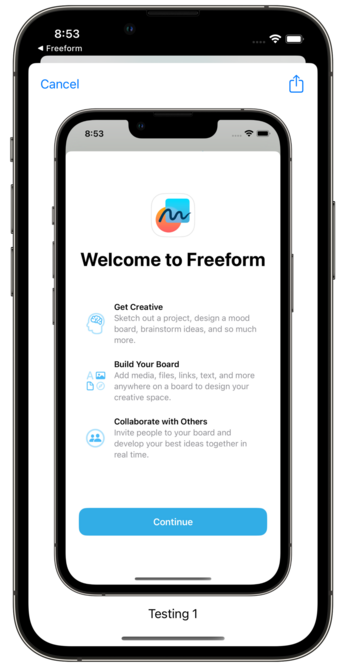
Trying to get the icon correct but keep running into issues. Any advice?
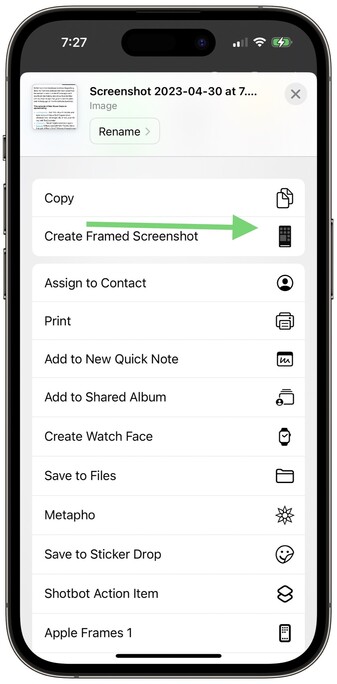
Figure it out!
 butternut
@rwitherspoon if you’re not already aware, action extension icons need to be a template image (where only the opacity matters). See https://developer.apple.com/documentation/uikit/uiimage/providing_images_for_different_appearances#2993864

When I take a screenshot and grab the preview, the image in the action extension has a height/width that’s divided by 3 (device scale) which is messing things up. I tried scaling the image by a factor of 3 but it results in this. Anyone have an idea of what’s happening?
Turns out I needed to explicitly pass a UIGraphicsImageRendererFormat with a scale of 1 to the UIGraphicsImageRenderer. Then multiplying the image size by image scale works as expected.