 John Siracusa
Moving the insertion point long distances in the Safari address bar is one of the most tedious interactions in iOS.
 Kevin Crossman
Custom URL keyboard to the rescue! https://testflight.apple.com/join/vlrv6dn1
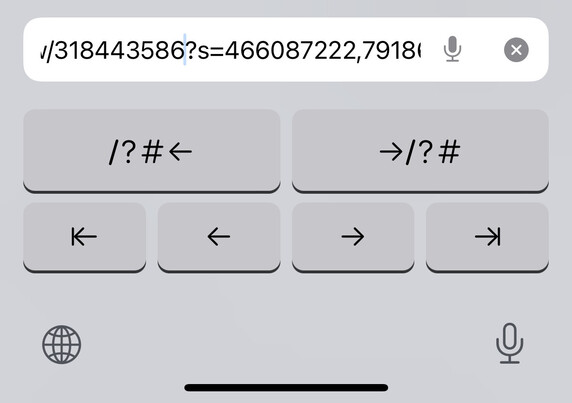

This keyboard was created by @elijah
 Felix 𝄢 (what is normality)
 clokey74
 (MOVED) Zack Apiratitham
 Jan Lehnardt
 Max Siegel
 wakest likes your bugs ⁂
 Harri Granholm
 Dan Morgan
 Leon Cowle
 Toni Lampela 🇫🇮🇺🇦
 BoxOfRain
 DΛNIEL TʘMΛN
 mcj
mcj Doctor Memory
@siracusa !!!!! I'll look forward to using this the instant it's out of beta. (And no offence but I hope Apple Sherlocks this ASAP.)
Having never looked at the keyboard APIs: would it be possible to have a hotkey for "Copy everything up to the query/anchor operator to the clipboard" and/or "open a new tab on the root URL for this site"?
 Adam Overholtzer
@siracusa @memory @elijah The keyboard API only provides access to a subset of the adjacent text, but that may be enough to copy the full URL… you’d have to test it to find out.
The keyboard can’t interact with Safari, unless there is a hacky / private API trick. I have done some unsupported things with share extensions but haven’t tried with keyboard extensions.
 David J. Whelan
@siracusa Instant download!
 Julian Kussman
@siracusa my first feedback was to put these new nav buttons in the autocomplete area of a “regular” kb so we can type and navigate.
 Bobby Perrotti
 Craig Hockenberry
@siracusa Needs a backspace key, but otherwise awesome!
 Taimar Teetlok
@chockenberry @siracusa and an Undo button to bring back characters that get deleted too eagerly (you know, when holding down the backspace button)
/cc @elijah
 David MacDonald
@chockenberry @siracusa also maybe include & in the top row navigation buttons
 Kaito
Kaito@siracusa oh my god
 EndlessMason
 Jim Luther
@siracusa I’ve already sent feedback based on my long-suffering ownership of Apple’s URL API.
 Donovan Watts
@siracusa This is fantastic.
 Stand up for 🏳️⚧️&🏳️🌈 rights
@siracusa Thanks for letting me know about this awesome keyboard. Almost perfect.
 Graham Harper
@siracusa so awesome, great find.
 David Sheehy
@siracusa I’d like to know what questions “custom keyboards” are not the answer to.
 Scott Gruby
@siracusa Just an FYI, this keyboard may crash Messages on the Apple Watch. I have no idea how they are related, but after 2 wipes of my watch and deleting message threads, I looked at the crash log and it dawned on me to turn off the keyboard.
I've sent feedback to Elijah.
@siracusa Reinstalled and the crash went away. Now I’m going crazy.
 SYRiNX
@siracusa - All it needs now is a button to strip off the question mark and everything after it, so it can automatically remove all the garbage referrer/tracking parameters always tacked o to news URLs by Facebook.