 Simon B. Støvring
Have anyone built DocC documentation for a Swift package that works on both iOS and macOS?
It seems impossible to create documentation that contains all symbols but specifies if they're available on iOS, macOs, or both. Or am I missing something?
Have anyone built DocC documentation for a Swift package that works on both iOS and macOS?
It seems impossible to create documentation that contains all symbols but specifies if they're available on iOS, macOs, or both. Or am I missing something?
@simonbs Right, that's not possible out-of-the-box today. We'd need support in the build system for multi-platform products first.
If you generate symbol graph files manually from the Swift compiler though for each platform, you can provide all of them to DocC and it will merge them together into a single page. For example https://developer.apple.com/documentation/swiftui/app
@franklin_ I finally had some time to dig into this and managed to get it working! Thanks so much for the guidance!
Here's the script I put together to generate the documentation: https://gist.github.com/simonbs/23cc1c1cd3543f443cd7d377616a7013
Only major pain point is that I need to annotate every single public symbol with @available() in order for the platform to show up in the documentation, even if the symbol is available on both platforms.
@simonbs That's because DocC doesn't know what the 'default' availability of symbols are, i.e., which platform + OS version they're available in. It's not necessarily the version associated with the toolchain you used to compile documentation, since in many cases you want to be backwards compatible with older clients.
You can define your default availabilities in your DocC Info.plist file, like in this example: https://github.com/apple/swift-docc/blob/main/Tests/SwiftDocCTests/Test%20Bundles/TestBundle.docc/Info.plist#L25
@franklin_ Of course you already thought of this! So handy!
I tried it out but it seems like DocC isn't picking up my Info.plist file. The default availabilities aren't reflected in the documentation but the text within Documentation.md is included so the bundle is being picked up. It's the same result whether I compile through Xcode or my script.
Is there anything I should be aware of when using Info.plist files with DocC?
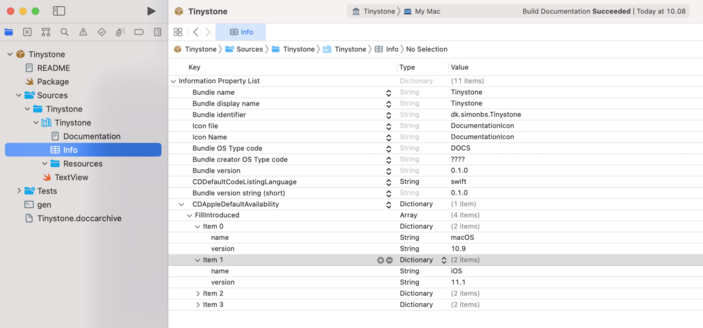
@franklin_ Ah, okay. That's probably necessary.
It's a little tricky in my case because I have completely separate implementations of a type for iOS and macOS but the type has the same name and needs to be shown as a single type in the documentation. That'll require quite a few @available() annotations but that's fine.
Now I just need to figure out how I can get my script to pickup the Info.plist. The default availabilities seem to only be picked up when compiling with Xcode.
 Franklin Schrans
