It’s here! We’ve introduced a ton of updates to improve the fundamentals of 1Password:

🔁 Reorder fields and sections
📱 Revamped Face ID unlock
🔐 Set a default vault for saved items, and more

Read more about what’s new: https://releases.1password.com

1Password Releases

All the latest releases from the 1Password team

@1password Thanks for the update. I ❤️ my 1password!

Please can you consider this request from 2018 : “Add port number to URL filter for available logins”, this will help many IT people. Thanks!

https://1password.community/discussion/99568/add-port-number-to-url-filter-for-available-logins

Add port number to URL filter for available logins

I run multiple services available over HTTPS on the same domain.

1Password Support Community
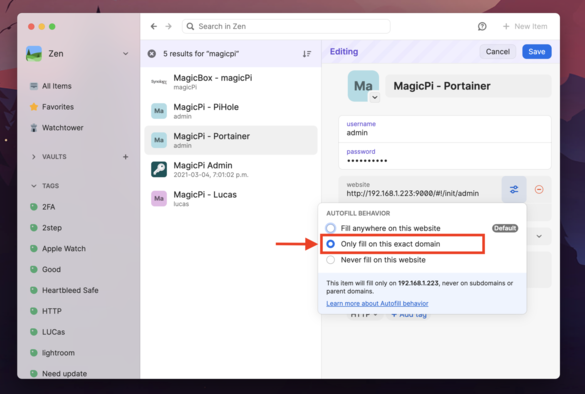
@lucas3d This is implemented now (on the Mac version, anyway!), it was in the last beta. You have to edit the url and click the little toggle icon, and then set to “Only fill on this exact domain” and then it will only suggest that password if the url matches the port too. It’s a manual process for each entry, but it works.
@BradRomance Fantastic! Yes, it takes time to fix all my entries, but it’s working perfectly. Thanks a lot for the tips!!!!
@lucas3d Only took me 5 mins to do all mine. The setting filters through to the iOS app too, I just tested it. 🥳
@BradRomance I’m slower than you or (and) I have more login than you :-). But it's a game changer! I was waiting for this for years... Thanks 🥳
@lucas3d @1password More advanced URL matching is something on our roadmap for this year. https://support.1password.com/autofill-behavior/ Port matching isn't there yet but hopefully that is something we can address with future work.
Change where a login is suggested and filled | 1Password

Learn how to adjust autofill behaviors to change where logins are suggested and filled.

1Password
@ben @1password Thanks for your reply! I recently used “Only fill on this exact domain" on all my login with different port. It was manual process but and it's working perfectly. Now I see only the login related tot he service. Thanks @BradRomance for the tips! #1Password
@lucas3d @1password @BradRomance Glad to hear that recent improvement has helped!
@1password Finally! Reorder items is something I have been waiting for for ages!

@1password does 1password support generic MFA accounts now? I remember a while ago it only let you configure certain domains for MFA which was a pain. Or I was using it wrong?

Shorter question. Will 1password let me import all the accounts I currently have in last pass authenticator and does it sync those to the cloud?

@johnkelly @1password 1Password can generate MFA codes for any site that supports the TOTP (Time-based One Time Password) standard. We can import from LastPass, and do sync your encrypted data to all of your signed-in devices via 1Password.com.
@1password these features are great! Thank you
@1password is it possible somehow to reorder favorites on iOS? The issue is that with shared vaults any item that is marked as a favorite by anyone becomes a favorite for everyone, but that isn’t always desirable.
@mikaellu @1password If you press and hold on the word Favorites on the 1Password home screen you can select how you'd like favorites to be sorted. Our product team is looking at how we might better handle the state of play for "shared favorites" in general, but hopefully that helps for now.
@ben @1password thanks. Yes I noticed that, however it is not really enough, the sorting criteria are too general. I'd possibly like the option to sort stuff from my own vault above shared vaults, or maybe a separate favorites list for my own private vault and one for shared vaults. (and I have both business and family setups).
@mikaellu @1password Thanks! Sorting favorites in shared vaults below favorites in your private vault is something the team has brainstormed on. I've shared with them that would help in your use case. 🤞
@ben @1password thanks! Keep on brainstorming then 😃
@1password have you fixed forcing people to enter their master password every 2 weeks even though the platform is using biometric login and has been active? Cause that’s the one thing that makes me feel stabby.
@jorj @1password There is a setting in 1Password > Settings > Security. Remembering the account password is critical though! Please consider printing your Emergency Kit and writing in your account password if you are going to set this to longer than 2 weeks. In the future, Passkeys should help here: https://blog.1password.com/unlock-1password-with-passkeys/
Goodbye, passwords | 1Password

We’re all-in on passkeys, and we’re starting with 1Password.

1Password Blog

@ben @1password is that a new setting? Because the old setting didn’t make any difference.

Regardless, thanks for the heads up.

@jorj @1password Not a new setting, but one we're hoping works more reliably after these updates. If you're still having trouble, please shoot us an email so we can troubleshoot. :) [email protected]
@ben @1password Where is that setting on iOS?
@jorj @1password 1Password (icon in the upper left) > Settings > Security
@1password when can we expect a fix for the Safari extension to work on iOS with Lockdown Mode turned on?