Introducing my hobby coding project since xmas:

Mastotron!

It's a different interface to Mastodon, replacing the mindless "feed" of most social media with a network map of conversations and recent and popular posts.

👉 You can download it here: https://github.com/quadrismegistus/mastotron 🖖

There's easy, double-click installation for Mac and Linux; Windows is a bit trickier for now.

This is b new, so bound to be bugs. But if you can, give it a whirl, and let me know if it works and what you'd like to see!


GitHub - quadrismegistus/mastotron: A different interface to mastodon, and other experiments in social media

A different interface to mastodon, and other experiments in social media - GitHub - quadrismegistus/mastotron: A different interface to mastodon, and other experiments in social media

GitHub
Some pictures:
@heuser Is the layout defined by any sort of similarity space re: tweet content, or is it a force-directed graph?

@TedUnderwood Nodes are almost entirely positioned by those two axes on bottom left: most recent (top) to least (bottom); least engaged-with (left) to most (right). But at the last second a force layout tries to push them away from each other to make them more legible.

I tried a lot of layouts and found ones like this, conveying something mundane but specific & meaningful, were more cognitively satisfying than a force layout or the content vector similarity I tried, (tho I'd like to try again)

@heuser Rad, going to pull this up next to Obsidian for maximum rhizomatics
(I guess "rhizomatics" isn't totally appropriate but whatever)
@heuser wow! Interesting concept.
Looks very interesting. Now I have to test it.

@heuser Nice!! First impression from looking at the screenshots: have you considered flipping the directions of both X and Y axes? (I mean flipping each axis individually, not switching them around).

In Western languages we tend to read left-to-right top-to-bottom, so putting the most-engaged posts to the left and their replies to their bottom-right would put them in a more natural reading direction (also making the flow of arrows looking more like a folder tree, or threaded email).

@heuser Looks awesome, will check this out! @paulgb's Treeverse might be food for thought on some of the layout questions - https://treeverse.app/.
Treeverse for Bluesky

Treeverse for Bluesky

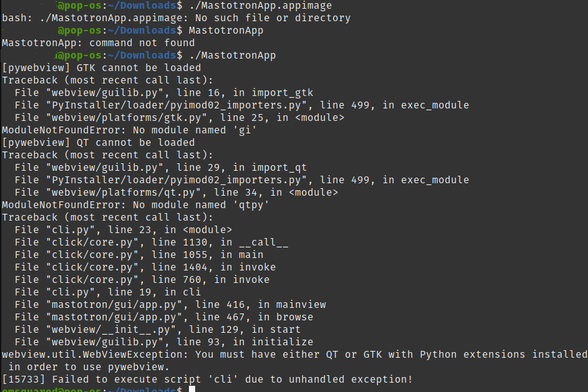
@heuser Linux version does not seem to be working for my distribution (Ubuntu 22.04.1), is it because of my window manager? (i3)? Will log off later and try again. Looks nice.
@jose_eduardo Thanks!! I have not been able to properly test the linux version. Will take a closer look
@heuser @jose_eduardo Same problem here on Archlinux.
@heuser @jose_eduardo If I try to run from terminal I get the following:
@jose_eduardo @heuser Same for me on Pop-OS (which has a ubuntu base)
@heuser some hashtags will improve discovery
@TedUnderwood hmm, I dunno. Is it ready for the ... #primetime ?
@heuser This is the thing I hopes more people would do: access the API, it is free! We need different interfaces, different ways to use it. I would love a reddit-like nested discussion tree for one
@heuser this is delightful, I love how different the interaction is
@heuser that is awesome! Can't wait to give it a try
@heuser looks amazing! Look forward to future windows updates! Good luck!

@heuser Looks interesting! Any plans to add a license?

https://choosealicense.com/no-permission/

No License

You’re under no obligation to choose a license and it’s your right not to include one with your code or project. But please note that opting out of open source licenses doesn’t mean you’re opting out of copyright law.

Choose a License
@downey Oops, forgot to include it! thanks for pointing it out. Just added the GNU license
@heuser I likely follow too many people for this to work well, it is sprawling all over the place on my very big screen
@KevinMarks If you click that pound sign on the sidebar you can change the maximum number of posts shown. But yeah they'll take up as much space as the window allows. You should be able to resize the window, though the zooming-to-fit isn't working that great.
@heuser I turned it up to 250 and they went offscreen, then I resized and it became a weirdly zoomed out thing. is there a way to zoom? pinch zooming would be nice

@KevinMarks I turned off zooming to make it easier to pan and drag but maybe we need it back because the window is overriding the refresh button to pull in new tweets and there's no manual refresh button on the pywebview mini browser.

If you open up http://localhost:1789/ in a browser you should get same interface with your browser's refresh button. That should resize the interface better. Posts might take a while to load in the second interface at first.

@heuser Awesome, had the idea of a similar systemmas a chat with bubbles sorted by hashtags and interconnected depending on relevance.

Never started building it.

@heuser 😔 Ubuntu 22.04.1 LTS
@heuser
What a great idea! Kudos! 👍

@heuser Very interesting! When I first launched it on my Mac (Ventura 13.2) it wouldn’t run; got the message:

> “Mastotron” can’t be opened because Apple cannot check it for malicious software.

Had to go into Settings->Security and allow it to run anyway.

@Green_Footballs Thanks for letting me know. I think another workaround is to Ctrl+click it at first (but I think that depends on what security settings you have in Sys Pref). whew – glad it worked!
@heuser this looks fantastic! It’s awesome to see how far you’ve moved from the mini-present feed, but how intuitive it looks!
It’ll be a while before I’m on a non-mobile computer, but I look forward to playing around with it!
@heuser this is extremely cool. having a lot of fun with it.
@heuser What a new tool/game/app !!! I'm gonna try it !!! 🤓
@heuser that would certainly interest journalists… it reminds me « nasty » paywalled SaaS solutions which used Twitter API. Thanks for putting all that work under GNU license.
@heuser This is awesome. Great work.
@heuser interesting (just posting this here, so I can easily find it when on a puter)
@heuser Just had a play with this, it's very cool way to display your time line. If you got many keen posters, that you are following, this becomes very busy and hard to follow. But it does feel like the future when you are using it :)
@heuser this is awesome as I've been looking for something more relationship driven (see some of my previous posts). I'd settle for a folder type view - posts by people I follow, tags I follow, and conversations I've participated in so I can keep track of what I have and haven't read. But the graph view also sounds interesting - and definitely bang on point for exploring our "social graph" that we are supposed to be the nexus of.

@heuser This is... incredible. You have taken something, social media, that's commonly "consumed" today as a "feed" (as if we're livestock on a farm), and made it person-centric again.

It's just a much more human way of looking at things. Instantly, just looking at your example, I started seeing _people_ talking to each other in a visualization tool, instead of just a _feed_ (which is something a computer consumes).

And this is all built completely on Python, even the graphical side?

@mdm No the visual side is all javascript (visjs for the metwork) and html/css; python is running flask as a mini server to talk to that javascript client. Thank you for the kind words!!

@heuser This might interest you as a journalist, look at it
@joannastern
@gruber

Cet outil pourrait vous intéresser en temps que journaliste ou journal.
@Mediapart
@arretsurimages
@lesjoursfr

@heuser amazing, can't wait to see people using it in VR

@heuser

Looks like the Linux version doesn't work for me on Ubuntu MATE 22.10.

Here's what I get when I try in the terminal:

@heuser This is pretty neat. My main gripe is that keyboard commands in a generally mouse-heavy interface is awkward. Maybe a set of play/pause/next buttons at the top of the window instead of typing 'N' and 'P' and then 'D' could be replaced with a context button when you hover over a post.
@lehi @heuser This is a really good point. Wanted to mention that right-clicking will do the (C) action of pulling in context/replies. But it'd be nice to have a mouse/click solution to each of the actions. Got an issue for that now (attrib your post you but lmk if you want that removed): https://github.com/mastotron/mastotron/issues/21
Making mouse/click equivalents for all keyboard actions · Issue #21 · mastotron/mastotron

Great comment from online:

GitHub
@heuser this is really cool, although I doubt I would use it since I use Mastodon on my mobile
@heuser Excited to give it a shot! This project seems to have much creativity involved!
@heuser gib dir mal das @Patrick
@christian @heuser @Patrick #Mastotron ganz witzig, mal eine andere Ansicht auf die Toots. Allerdings in der v0.4 zeigt's wohl nur die letzten paar Toots aus der TL. Wäre prima, wenn man damit neue Account finden könnte
@heuser thanks for making this. I would love to try it, but I am not so great at it so far (see issue 8 in repo).
@heuser good idea. I think a tree view might be more useful than a graph though.