
Ported my @covidsewage bot over to Mastodon

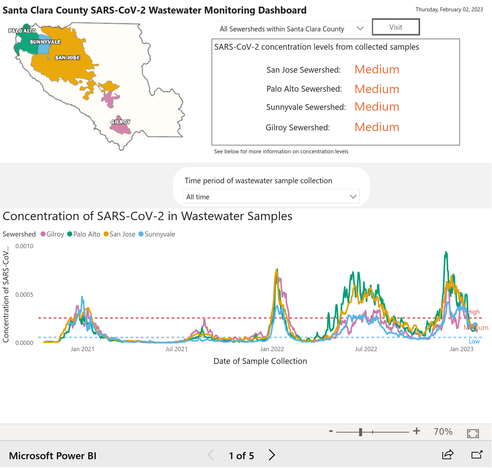
Every morning it posts an image with the latest Covid sewage charts for various locations around the San Francisco Bay Area - because the sewage charts are the only figures I still trust!

The sewage doesn't lie

The screenshots come from https://covid19.sccgov.org/dashboard-wastewater - here's the latest image:
The bot runs entirely from this GitHub scheduled actions workflow: https://github.com/simonw/covidsewage-bot/blob/main/.github/workflows/toot.yml

It uses my https://shot-scraper.datasette.io/ CLI screenshot automation tool and the excellent https://toot.readthedocs.io/ Mastodon CLI utility

covidsewage-bot/toot.yml at main · simonw/covidsewage-bot

The @covidsewage bot. Contribute to simonw/covidsewage-bot development by creating an account on GitHub.

GitHub

@simon Have you thought about turning shot-scraper into it's own image with the browser pre-installed?

If you did this, it could be called as it's own GHA step and greatly reduce the number of steps needed to invoke it.

@webology I had not! I've not looked at that side of GitHub Actions at all, do you know if there are any good examples I could borrow from?

@simon the tl;dr is you add a Dockerfile (shot-scrapper install + playwright install) and an action.yml file to your repo and then you can call it / pass args/options to it like any other action step you use.

https://docs.github.com/en/actions/creating-actions/creating-a-docker-container-action is actually pretty good.

Creating a Docker container action - GitHub Docs

This guide shows you the minimal steps required to build a Docker container action.

GitHub Docs
@webology and then GitHub build the image once and reuse it for their workers? Neat, I should try that

@simon since it's been >6 months since I last played with it, I think I had to build the image and then push it on my own.

Then I had a Dockerfile which reference that image referenced in my actions.yml file. I need to try it out again because they may have updated it to just work without the build/push step.

@webology @simon When it's just a couple of simple steps, I stick with reusable workflows or composite actions.

I have a repo with a few simple things I've abstracted for my own usage that I use in a couple of repos: https://github.com/browniebroke/github-actions

For my usage, actions with Dockerfiles present too much overhead: building each run feels wasteful and I never got around to push the pre-built image.

GitHub - browniebroke/github-actions: A collection of my own GitHub actions

A collection of my own GitHub actions. Contribute to browniebroke/github-actions development by creating an account on GitHub.

GitHub
@browniebroke @simon the pre-built images are what speed things up. I'm not a fan of rebuilding on each run which, sadly is the default with GitHub Actions.

@simon @webology

Last time I did this, it would rebuild the image on every usage. Got much better performance by building the image and storing it on ghcr.io, but then you’ve got *another* pipeline

@__steele @simon that seems reasonable and potentially more stable than pointing people to a git repo. A
@webology @__steele I'm still pretty uncomfortable with any GitHub Actions pattern that could allow someone else to break my workflows by updating their action that I'm reusing - most of mine tend to stick to the official https://github.com/actions building blocks for that reason
GitHub Actions

Automate your GitHub workflows. GitHub Actions has 80 repositories available. Follow their code on GitHub.

GitHub
@simon @webology @__steele for exactly this reason (and to make life during audits simpler) I started to bundle all third party actions. The only drawback is that updating them in case of new features or bugfixes is a manual process :/

@fallenhitokiri @simon @__steele This is exactly why I use pip-tools + pip-compile and install from pinned versions aka for repeatable builds/deploys.

I think the same is true for GitHub Actions whether they are in against a repo or a repo's image.

So this feels more like best practices to follow for any packaging ecosystem.

If you build an action, I would tag/branch your version (docker or not) and you will have a more stable process.

@webology @fallenhitokiri @simon @__steele This is what we do with Heroku buildpacks and custom actions, otherwise we’re basically giving system write access to unknown parties.

We fork the repo and use that to point towards. And then install Probot to handle reviewed merges from upstream on a schedule. That way we can “keep up” without the security downsides.

@webology @fallenhitokiri @simon @__steele This is the Probot-based bot we use to do that: https://github.com/wei/pull
GitHub - wei/pull: 🤖 Keep your forks up-to-date via automated PRs

🤖 Keep your forks up-to-date via automated PRs. Contribute to wei/pull development by creating an account on GitHub.

GitHub