@GatekeepKen
alt text for the image in the post:

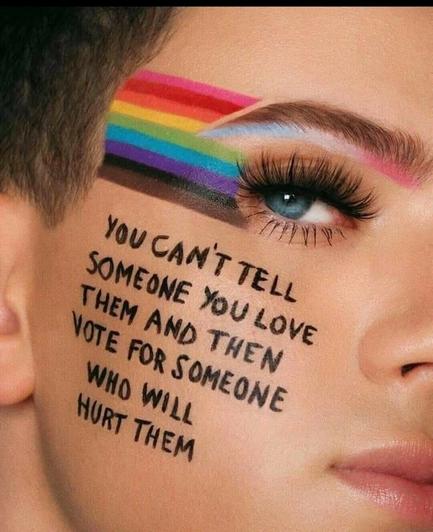
close-up picture of someone's right eye and cheek. they have blue eyes and long black eyelashes with mascara applied on them. there is a rainbow flag painted next to the eye, reaching the hairline. there is a very slight transflag-coloured gradient (baby blue, white and pink) right under the eyebrow.
the focal point is the following sentence, painted on the person's cheek:
"you can't tell someone you love them and then vote for someone who will hurt them"
@yellow
WHY?
It doesn't need an explanation .

@GatekeepKen When you upload an image to Mastodon, most clients allow you to enter an image description (sometimes called alt text or caption), usually by tapping on "Edit", or on the uploaded image itself.

The alt text help those who rely on a screen reader, ppl with visual processing disabilities, or any user on a slow connection for whom images take a long time to load.

It's part of Fediverse culture to provide image description if you are able to. Read more:
https://fedi.tips/mastodon-and-fediverse-accessibility-tips/#HowDoIMakePostsMoreAccessibleToBlindPeople

Mastodon and Fediverse Accessibility Tips | Fedi.Tips – An Unofficial Guide to Mastodon and the Fediverse

An unofficial guide to using Mastodon and the Fediverse

@herzleid

Thanks that a good help . It went viral. It never crossed my mind to edit it.

@GatekeepKen No problem 🙂

Nowadays (since Mastodon v.4), you actually have the ability to edit your posts (tap the 3-dot menu, "Edit"), but in order to add an image description you need to delete the image and re-upload it (while editing your original post, don't delete the whole post!) — then you can enter the alt text and re-publish the edited post.

Anyone who has already starred or boosted will be notified the post has been edited, it won't disappear. :)