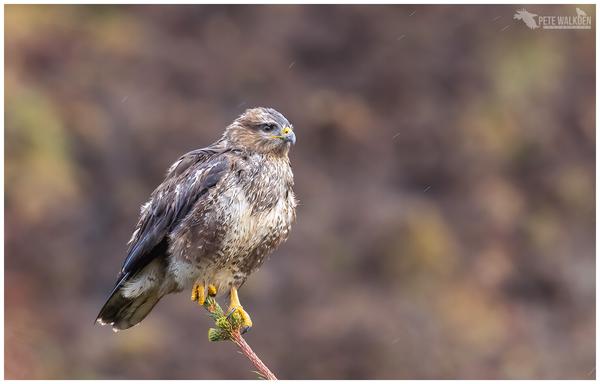
Common Buzzard.

Even though there are high numbers of these raptors living on Mull, they still usually fly away as soon as a vehicle parks nearby.

Today, this one chose to ignore me, to continue scanning the area below where it was perched, for prey.

Gorgeous, oft overlooked birds, that have a wide range of variations in their plumage colours, and manage to survive in the harshest of conditions.

I'm a fan.
#buzzard #wildlife #nature #photography #mull #scotland

@petewalkden

You jammy bugger!

*Really* liking this one, Pete - this presses all the right buttons for me.

@keithreeder šŸ˜‚ It even remained perched when I moved the car twice to get a better background. Another with the R7, this time with my EF500 mk2 and 1.4TC,

@petewalkden

What ISO were you at, Pete?

@keithreeder 1600. Not much noise on it, though the bird was pretty close, so I've not needed to crop in much, and I've run the image (at jpg stage) through Topaz Denoise. More to smooth off the backdrop than anything.

@petewalkden

Thanks, Pete.

If you have a chance, could you humour me and put up a version without Topaz, please?

No problem if not.

@keithreeder This has just been cropped and resized. Nowt else.

@petewalkden

Thanks, Pete.

OK, if you don't want to have this conversation that's absolutely cool, but: when you sharpen in Lr, do you use the Sharpening Mask tool?

I've been working with a pal who was unhappy with his "noisy" 7D Mk II, and it turned out that it was down to his Lr workflow.

With respect, your buzzard's BG is noisier than I would expect from 1600 ISO and a light(?) crop, so I'm just wondering.

Tell me to mind my own business, by all means!

šŸ˜€

@petewalkden

Case in point: not a great picture (not many Buzzards or Eagles on my doorstep! šŸ™‚), this is my R7 at 4000 ISO, cropped.

I sharpened used the Sharpening Masking slider; then I selected the background (Select Subject > Invert), denoised it and "added" some -ve Texture.

I think this looks good, noise-wise - all easily done, and staying within Lr's toolset - and really, I could dial back on the (already light) NR on the bird.

(Again, I will wind my neck in if so instructed..! šŸ˜‰)

@keithreeder Just tried that on my buzzard image and it looks great for the background.

A handy tip, thanks šŸ‘ I may well use this in some shots in the future.

@petewalkden

It just makes things easier - I think, anyway - not to *have to* hand off to another programme, Pete.

Plus, I find that I can get better results by applying sharpening and NR selectively rather than globally - that way there's less to-and-fro trying to get the perfect balance between the two. Even the "AI" NR apps available nowadays don't know what I want, better than I do.

@keithreeder I do similar but in PS. I use the subject selection and invert it, then use NI. I use Topaz when the subject needs NR. I’m assuming LR is more accurate these days at subject selection as it used to be a bit vague at times?

@petewalkden

"I’m assuming LR is more accurate these days at subject selection as it used to be a bit vague at times?"

Works fine for how I use it, Pete: I mainly use it to apply selective sharpening and Texture, which can really bring out fine detail used sparingly.

If I'm dealing with a lot of high ISO stuff, I'll likely use a different converter, one that gets the job done in one hit.

Capture One, say: R7 @ 5k ISO at C1 defaults, and I'm very happy with this in NR (not content!) terms:

@petewalkden

Mind you, Lr's not too shabby at "only" 5000 ISO either: nothing done except Sharpening Masking, and Luminance at (an arbitrary) 6:

@keithreeder I do use the mask tool, but I really don't do much in LR.

Looking at your starling though, I might add some steps in.

That said, the background is usually dead easy to smooth out in PS with Neat Image or Topaz. I have more of an issue with noise on subjects, especially white ones, like barn owls (not that I've seen many here).

I should also point out that right now I'm limited to using my old MacBook Pro, not my PC. So images aren't to my usual standards.