 Ryan Legler
Hey tailwinders out there... What do you do to fight tailwind class soup?
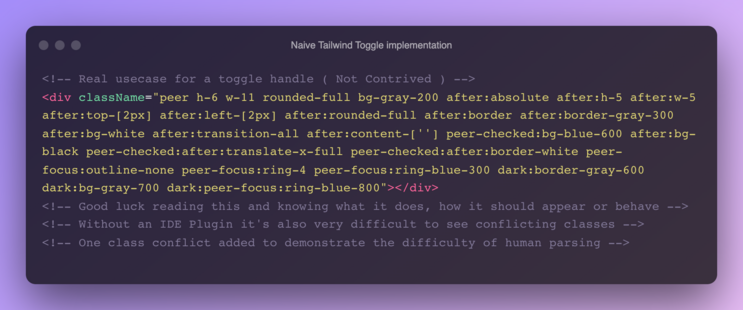
Hey tailwinders out there... What do you do to fight tailwind class soup?

@kuldar Experimenting with a few options...
1. Extract classes out to a StyledComponent - supports Template literals so you can at easily break classNames into multiple lines - vscode tooling still works too!
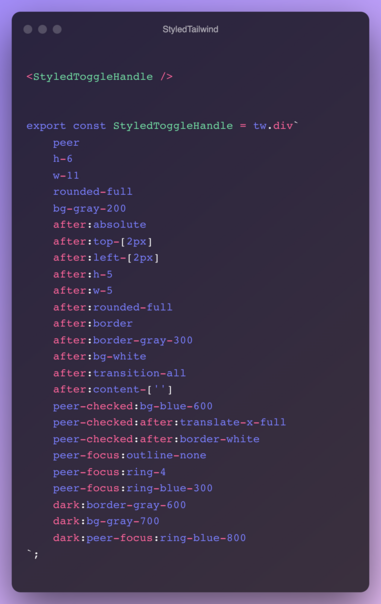

Create tailwind css react components like styled components with classes name on multiple lines. Latest version: 2.2.0, last published: 10 months ago. Start using tailwind-styled-components in your project by running `npm i tailwind-styled-components`. There are 15 other projects in the npm registry using tailwind-styled-components.
@ryanlegler Yeah I guess that's kinda similar to the @apply method of Tailwind, but it seems to be discouraged as it's a step back towards coming up with classnames, de-colocating styles from elements and creating potantial invisible dependencies.
I really wish there was something like this in VSCode where you could either collapse all styles that you're not interested in, have some line-wrapping for the classnames as you mentioned, etc.
I found what you were looking for:
https://github.com/moalamri/vscode-inline-fold
Via https://github.com/tailwindlabs/tailwindcss/discussions/7922
Kuldar found this tailwind specific addon ⬇️
https://hachyderm.io/@kuldar/109594102154495757
I’ll give them both a try soon.

Attached: 1 image This is the exact VSCode extension I've been wanting for all these years working with Tailwind 🔥 https://marketplace.visualstudio.com/items?itemName=stivo.tailwind-fold
 kuldar
 lil5
lil5  🚲 🇳🇱
🚲 🇳🇱