 Christophe
📢 🎄 📅 Advent of cloud security 2022
Every day between December 1st and December 24th, I will post an interesting fact about cloud security!
Follow #AdventOfCloudSecurity or the associated RSS feed
⬇️
📢 🎄 📅 Advent of cloud security 2022
Every day between December 1st and December 24th, I will post an interesting fact about cloud security!
Follow #AdventOfCloudSecurity or the associated RSS feed
⬇️
🗓️ December 1st - On S3 bucket ACLs
You might expect that an S3 bucket ACL granting READ access allows to... read objects in the bucket.
Far too logical! It actually allows listing objects in the bucket.
References: https://docs.aws.amazon.com/AmazonS3/latest/userguide/acl-overview.html#permissions
Using bucket ACLs is a bad idea anyway in general, you can disable ACLs for future buckets (this feature was released in late 2021)
Amazon S3 access control lists (ACLs) enable you to manage access to buckets and objects. Each bucket and object has an ACL attached to it as a subresource. It defines which AWS accounts or groups are granted access and the type of access. When a request is received against a resource, Amazon S3 checks the corresponding ACL to verify that the requester has the necessary access permissions.
🗓️ December 2nd
AWS SSM Parameter Store is a solid place to store secrets, and is free. Comparatively, AWS Secrets Manager secrets are $0.40/secret/month.
SSM parameters of type SecureString are encrypted at rest using a KMS key. If you don’t specify a key, it’s encrypted with an AWS-managed KMS key (alias/aws/ssm).
When you retrieve a SecureString parameter, ssm:GetParameter can transparently decrypt its value by calling kms:Decrypt on your behalf, assuming you’re authorized to use the key. You can also request the encrypted version of the parameter, for instance, if you want to pass it to an application that can decrypt it, and manually decrypt it using:
aws kms decrypt \
  --ciphertext-blob fileb://parameter.enc \
  --key-id alias/christophe-kms-key \
  --encryption-context PARAMETER_ARN=<your-parameter-arn>
Interesting one-liner for attackers to retrieve and attempt to decrypt all SecureString SSM parameters in a region:
aws ssm get-parameters-by-path \
   --recursive \
  --path / \
  --with-decryption
References:
🗓️ December 3rd
When you're inside a VPC with security groups and NACLs blocking outbound traffic, you can still exfiltrate data to the Internet using DNS
https://summitroute.com/blog/2020/03/31/isolated_networks_on_aws/
One way to prevent this is to use the AWS DNS Resolver Firewall
https://docs.aws.amazon.com/Route53/latest/DeveloperGuide/resolver-dns-firewall.html
🗓️ December 4th #AdventOfCloudSecurity
In AWS, even if your root user has MFA, an attacker can bypass MFA and compromise it under certain (restricted) conditions!
(original finding by @BenReser - give him a follow!)
More specifically, if the attacker has access to:
aws-portal:ModifyAccount permission,... then they can take over the root user following these steps:
aws-portal:ModifyAccount permission)This is one of these "by design" flaws that make sense in most cases, but may be considered dangerous in larger organizations.
One way to protect against this is to set the account phone number at provisioning time, and have an SCP with an explicit deny for aws-portal:ModifyAccount in all member accounts.
References:
Side note: SCPs do not apply to AWS management accounts. For management accounts, you want to limit who has admin access.

August 8, 2022 – We made minor updates to some of the steps and images for resetting a lost MFA device. To help secure your AWS resources, AWS recommends that you follow the AWS Identity and Access Management (IAM) best practice of enabling multi-factor authentication (MFA) for the root user of your account. With MFA […]
🗓️ December 5th #AdventOfCloudSecurity
AWS just released a "zero trust network access", AWS Verified Access, that allows accessing HTTP(s) endpoints inside of a VPC without a VPN, leveraging instead AWS SSO or OIDC authentication.
Somewhat similar to Azure AD Application Proxy and Cloudflare Zero Trust.
It costs around $220/month/application in eu-west-1, though, so may not fit all budgets.
References:

Today, we announced the preview of AWS Verified Access, a new secure connectivity service that allows enterprises to enable local or remote secure access for their corporate applications without requiring a VPN. Traditionally, remote access to applications when on the road or working from home is granted by a VPN. Once the remote workforce is […]
🗓️ December 6th #AdventOfCloudSecurity
An interesting way to identify public S3 buckets is bucket-stream. It watches the certificate transparency logs and generates possible bucket names from them.
For instance, when a CA issues a TLS certificate to “christophetd.fr”, bucket-stream tries to access christophetd-backups, christophetd-prod, staging-christophetd...
Other solid tools to discover S3 buckets:

Find interesting Amazon S3 Buckets by watching certificate transparency logs. - GitHub - eth0izzle/bucket-stream: Find interesting Amazon S3 Buckets by watching certificate transparency logs.
🗓️ December 7th #AdventOfCloudSecurity
Say you're targeting a specific AWS account you know the ID of. How do yo figure out role/IAM user names you might be able to abuse?
Turns out the answer is: S3 bucket policies. Yes, you read that right!
When applying a bucket policy granting privileges to a principal, AWS first checks that the principal exists and rejects your policy otherwise. You can use this as an oracle, and therefore brute force role / user names in an account.
Tooling:
iam__enum_roles moduleReference: https://hackingthe.cloud/aws/enumeration/enum_iam_user_role/
This also works with other resource-based policies, such as roles trust policies.

Tool to enumerate IAM Users and Roles by Abusing S3 Bucket Policies - GitHub - Frichetten/enumate_iam_using_bucket_policy: Tool to enumerate IAM Users and Roles by Abusing S3 Bucket Policies
🗓️ December 8th #AdventOfCloudSecurity
The most common way to access data of an EBS snapshot is to restore it, then mount it to an EC2 instance.
In late 2019, AWS also released support for "EBS Direct APIs", allowing to download locally individual data blocks of EBS snapshots. This effectively allows you (or an attacker) to download a full, local disk image of an EBS snapshot.
You can then mount it and run any local tool against the filesystem! Useful for incident response, forensics, offensive security, pick your poison.
Detection: ListSnapshotBlocks and GetSnapshotBlock are not logged by default in CloudTrail, as they are considered data events.
Tooling (that I manually confirmed is properly working):
References:
Additional notes:

Utility for downloading and mounting EBS snapshots using the EBS Direct API's - GitHub - RhinoSecurityLabs/dsnap: Utility for downloading and mounting EBS snapshots using the EBS Direct API's
🗓️ December 9th #AdventOfCloudSecurity
By default, pods running in AWS Elastic Kubernetes Service (EKS) clusters can access the instance metadata service (IMDS), and retrieve credentials for the instance role of... the worker node they're running on! This role includes permissions to read all ECR images in the account, describe EC2 instances, and even nuke all network interfaces in the account.
The implication is that by default, a single compromised EKS pod can do a lot of damage. The best remediation is to block pod access to the IMDS, either through a NetworkPolicy, either using iptables at the worker node level.
Note: The right way to give pods an identity in AWS is to use IAM roles for service accounts (IRSA), that we'll discuss in a few days. But enabling IRSA does not prevent pods from accessing the IMDS! You need to block pod access to the IMDS regardless of whether your pods use IRSA or not.
References:
Note 2: ECS tasks suffers a similar issue.
🗓️ December 10th #AdventOfCloudSecurity
Pods running in an EKS cluster often need an identity in AWS, for instance to write to an S3 bucket or read from a DynamoDB table.
The best (and easiest) way to achieve this securely is to use "IAM Roles for Service Accounts" (IRSA).
Every EKS cluster comes with a backing OIDC provider. You can set a trust policy on an IAM role to delegate it to the EKS cluster.
Then:
sts:AssumeRoleWithWebIdentity to exchange this token for temporary AWS credentials for the role!Bonus: this is totally transparent if you use the AWS CLI or an AWS SDK.
References:
🗓️ December 11th #AdventOfCloudSecurity - On preventing public S3 buckets
"S3 Public Access Block" is both an account-wide, and a bucket-specific setting that allows to (1) prevent buckets from becoming public in the future, and (2) ignore the configuration of exiting buckets to make sure they're not public.
A public access block configuration has 4 boolean settings - I'm summing them up below, but you should also read the in-depth documentation:
BlockPublicAcls blocks future bucket ACLs. In practice, a call to PutBucketAcl with a public ACL will be met with a "permission denied" error.
BlockPublicPolicy has a similar effect, but for bucket policies + access point policies.
IgnorePublicAcls renders current, existing public bucket ACLs ineffective.
RestrictPublicBuckets is unfortunately named, but it has the same effect, for existing bucket policies + access point policies.
Ideally, enable an account-wide S3 public access block with all settings turned on, and protect it with an SCP so nobody can easily turn it off.
Note: If an account and bucket public access block don't have the same configuration, the most restrictive setting is applied.
References:
🗓️ December 12th #AdventOfCloudSecurity - How the EKS API server authenticates requests
By default, the principal who creates an EKS cluster automatically has access to it. You can add further principals by editing the aws-auth ConfigMap, which maps AWS identities to K8s roles.
You authenticate to the API server by providing a token dynamically generated by aws eks get-token. This token is actually just a pre-signed URL for sts:GetCallerIdentity! Upon every API request, an in-cluster component (aws-iam-authenticator) calls this URL to authenticate you, then uses the aws-auth ConfigMap to authorize the request.
References:
Interestingly enough, the Hashicorp Vault AWS authentication backend works similarly - and it was vulnerable to an authentication bypass vulnerability in 2020 (to which aws-iam-authenticator wasn't vulnerable). See the amazing write-up from Project Zero's Felix Wilhelm.
🗓️ December 13th #AdventOfCloudSecurity
AWS automatically injects credentials in the environment variables of Lambda functions that have an execution role attached.
If you find a local file read vulnerability in an application running on top of Lambda, you can steal its credentials by reading /proc/self/environ.
Unit42 recently reported on a real-world attack using this technique: https://unit42.paloaltonetworks.com/compromised-cloud-compute-credentials/
🗓️ December 14th #AdventOfCloudSecurity
Encryption at rest in the cloud is generally regarded as a compliance checkbox that's questionably useful. However, in some cases, it's a powerful additional layer of defense.
If you make an S3 bucket public, anyone can access objects it contains. But if bucket objects are encrypted with a customer-managed KMS key, having access to an S3 object is not enough - you also need explicit access to the key! In particular, kms:Decrypt. You can then add an explicit deny to your bucket policy to ensure that all new objects are encrypted with the key you expect.
This adds some management overhead, so likely not worth it for every bucket, but definitely for sensitive ones.
References:
🗓️ December 15th #AdventOfCloudSecurity
If you have access to the AWS Console, you can also use that access to retrieve security credentials usable from the CLI, without creating any IAM user access key!
The trick is to use AWS CloudShell, which under the hood uses an internal AWS API to retrieve temporary security credentials for your current identity.
Particularly useful in pentesting or red teaming where you might compromise credentials of an user who doesn't have programmatic access, or cookies from a web browser.
https://blog.christophetd.fr/retrieving-aws-security-credentials-from-the-aws-console
🗓️ December 16th #AdventOfCloudSecurity
It's easy to imagine that Lambda functions are "disposable containers" that get spun up and torn down on each invocation. Unfortunately (or fortunately) that's not the case - it would be too slow. Lambda invocations actually reuse the same runtime environment (firecracker VM or container). Not always, but they do.
An attacker compromising a Lambda function through a RCE can therefore persist, and steal events of other invocations of the function, such as HTTP requests from other clients forwarded from an API Gateway!
References:
Original research: Yuval Avrahami (Unit42)
See also: Cold Starts in AWS Lambda

This post is also available in: 日本語 (Japanese)Serverless Security AWS Lambda was released in 2014 and introduced a new cloud execution model – serverless computing, which is now widely adopted. Since then, numerous companies began offering security solutions for AWS Lambda and serverless computing in general. These security platforms commonly provide: Vulnerability Scanning – Ensuring...
🗓️ December 17th #AdventOfCloudSecurity
You can retrieve the AWS account ID from any public S3 bucket. This technique leverages the s3:ResourceAccount condition key.
s3:ResourceAccount: 0*s3:ResourceAccount: 1*, s3:ResourceAccount: 2*...Tool: https://github.com/WeAreCloudar/s3-account-search
Reference: https://cloudar.be/awsblog/finding-the-accountid-of-any-public-s3-bucket/
The same technique also appears to work to guess Organization IDs (through the condition key aws:ResourceOrgID)
🗓️ December 18th #AdventOfCloudSecurity
If you have a security group that's open to something else than 0.0.0.0/0 and you restrict it further, it will not close established TCP connections.
This means in an IR case where you're blocking IPs, it's important to do it at the NACL level (which unfortunately may be impractical).
References:
Your security groups use connection tracking to track information about traffic to and from the instance. Rules are applied based on the connection state of the traffic to determine if the traffic is allowed or denied. With this approach, security groups are stateful. This means that responses to inbound traffic are allowed to flow out of the instance regardless of outbound security group rules, and vice versa.
🗓️ December 19th #AdventOfCloudSecurity
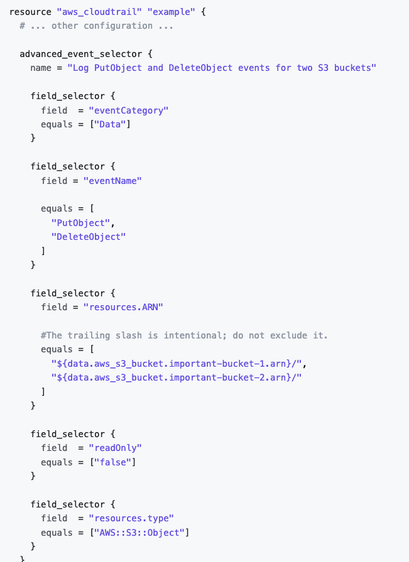
Reading/writing objects from an S3 bucket does not generate any CloudTrail event by default.
That's because they tend to be highly noisy. However, it might make sense to selectively enable it on high-value buckets. For instance, enabling the logging of object write events on a bucket holding release artifacts. Incidentally, it also gives companies with leaky S3 buckets plausible deniability to say they "have no evidence data was accessed by a malicious actor".
Same goes for other services such as DynamoDB reads/writes and Lambda invocations.
The Terraform aws_cloudtrail documentation has great examples on how to selectively enable S3 data events.
References:
🗓️ December 20th #AdventOfCloudSecurity
You don't need to open SSH ports to the Internet! Instead, you can use AWS SSM Session Manager to get a shell on any EC2 instance that runs the SSM agent (installed by default on several operating systems).
Advantages:
ssm:StartSession).Bonus: Also works for port forwarding and with standard tooling like Ansible or Packer.
Drawback: An attacker compromising an identity that has ssm:StartSession or ssm:RunCommand can trivially automate running a command on all your instances at once (see an example).
References:
🗓️ December 21st #AdventOfCloudSecurity
Most organizations getting breached on AWS are due to one of:
Last year, I wrote down an analysis on most publicly reported cloud breaches: Cloud Security Breaches and Vulnerabilities: 2021 in Review - 2022 edition will be out soon!
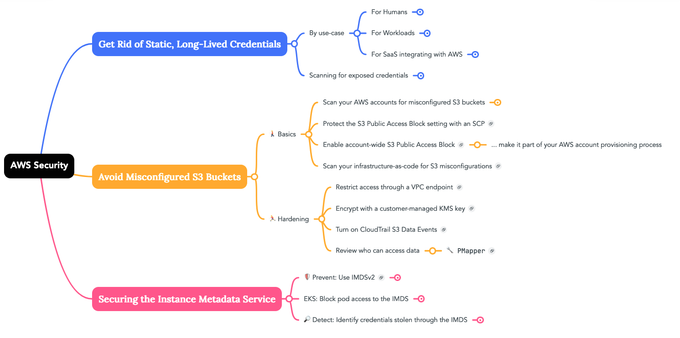
See also my SANS New2Cyber presentation: "A Primer on Cloud Security and How Companies Get Hacked on AWS" and the associated mindmap.
🗓️ December 22nd #AdventOfCloudSecurity
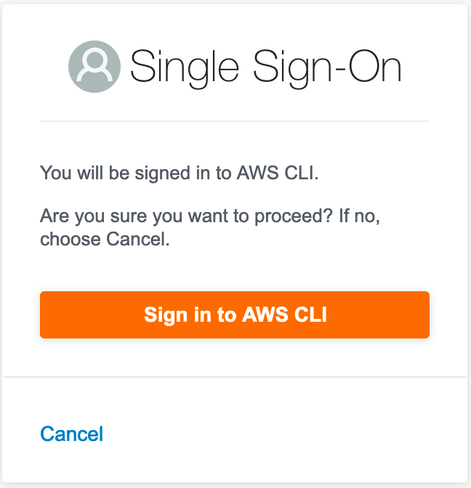
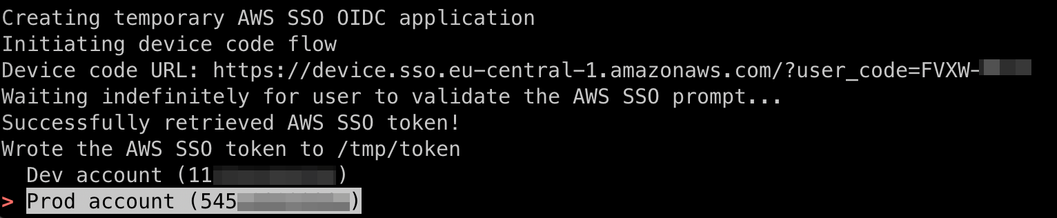
"Device code authentication" is a handy but also potentially dangerous feature of the OpenID Connect protocol.
For any identity provider that supports it, including AWS SSO and Azure AD, you can use it to bypass MFA / identity provider level controls such as IP allow-listing or device enrollment checks.
See a previous blog post with additional details, a proof of concept, and the detailed set of CloudTrail events generated.
🗓️ December 23rd #AdventOfCloudSecurity
"IAM vulnerable" by @sethsec is a great project to practice privilege escalation on AWS.
Comes with 31 different privilege escalation paths. Each one can be created and destroyed using Terraform, and comes with a write-up.
https://github.com/BishopFox/iam-vulnerable
https://bishopfox.com/blog/aws-iam-privilege-escalation-playground

Use Terraform to create your own vulnerable by design AWS IAM privilege escalation playground. - GitHub - BishopFox/iam-vulnerable: Use Terraform to create your own vulnerable by design AWS IAM pri...
🗓️ December 24th #AdventOfCloudSecurity
Together with @houston and @rami we wrote an analysis of over 50 publicly disclosed cloud breaches of 2022!
https://securitylabs.datadoghq.com/articles/public-cloud-breaches-2022-mccarthy-hopkins/
Merry Christmas to everyone who celebrates it!


