Hello #Rustaceans πŸ‘‹

I'm just getting started with #Rust and I'm following the tutorial here https://doc.rust-lang.org/book/ch02-00-guessing-game-tutorial.html and coding with #VSCode

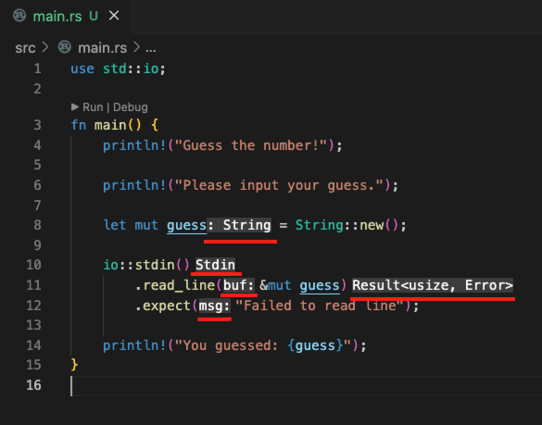
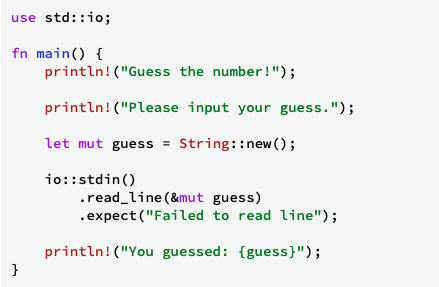
I'm wondering what those things added by VSCode are, compared to the original code I type.

What do they mean? Maybe they are important and helpful but they make my code reading more difficult πŸ€”

Thank you in advance for any helpful #tip πŸ™Œ

#programming #development #developers #tutorial

Programming a Guessing Game - The Rust Programming Language

@andreagrandi VScode shows the return type of your statements. This does help when you design your own program. Because you know what to do next.

It can become a bit distracting when your just input a lot of code from an example.

@jhaand @andreagrandi
Yeah, they're really distracting if they're long.
I find this VSCode setting helps though:

"editor.inlayHints.enabled": "offUnlessPressed",

The inlay hints are hidden unless you hold CTRL + ALT keys.

@jbwebb @jhaand @andreagrandi this. I also found the default hints distracting. Having a shortcut gives you best of both.

@gaveen @jbwebb @jhaand thanks everyone!

I just changed this setting in my workspace and it definitely makes the code more readable (while still giving me the possibility to see these hints when I want) 🫢

@andreagrandi @gaveen @jhaand
YW! Wonder why this isn't the default config..

@jbwebb @gaveen @jhaand is this specific for Rust integration or does it affect other languages too?

I normally use VSCode with Python and Golang and I've never noticed it before

@andreagrandi @gaveen @jhaand
If the setting is in the top-level JSON then inlay hints are controlled for all languages.

This will restrict the setting to Rust:
"[rust]": {
"editor.inlayHints.enabled": "offUnlessPressed"
},

Inlay hints depend on language extensions. Typescript doesn't seem to enable them by default but rust-analyzer does.