
I've a set of 508 digital rectangular images. They are the pages of an ancient Tamil dictionary & the basis for a collection of subrectangles. Each #subrectangle is defined by a pair, consisting of a #BASEimage & a #quadruplet (X1, Y1, W, H), where (X1,Y1) is the #UpperLeftCorner, W the width & H the right of the subrectangle. Number of pairs in my #XMLdataBase has today crossed 10,055. I should probably use a better format than "#background-image ...", possibly #SVG & would appreciate #advice.
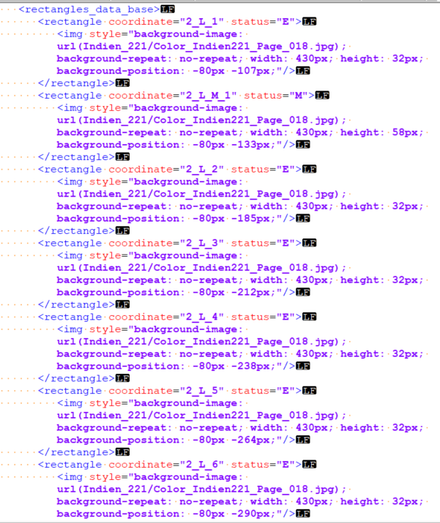
At the moment, when an image is displayed in a browser,
from <img style="background-image: ...>"
I do not seem to be capable of right-clicking and saving an individual subrectangle as an individual image. I must add that the #quadruplets for the subrectangles are generated automatically, as the result of a calculation on the set of heights for individual entries inside each column. Which rectangles will be most interesting is not predictable. Leisurely browsing & choosing would be useful.

For the record,
I have also tried to obtain feedback for the same technical question on Twitter, but so far there has not been any suggestion

https://twitter.com/JLC1956/status/1600143960118202368

Jean-Luc Chevillard on Twitter

“I've just stated on Mastodon the terms of a technical problem I would like to solve. It has to do with finding the best format for a collection of #subrectangles, ideally selectable via #leisurelyBrowsing, #rightClicking & #saving. https://t.co/dy0K5XqUIf https://t.co/EsN8U0orW4”

Twitter
@JLC1956 The problem is that you're essentially loading images through CSS (the style attribute) which puts them out of reach of the context menu (in most browsers). If you are generating the html from the xml yourself, why not load the images as src="file.png" instead of via the style="background-image: url" attribute?
@dingemansemark
The reason is that I do not want to multiply the number of actual files. On Twitter, I reworded thus:
« Stated otherwise, I want to avoid multiplying number of image files. Existing image files might be the 500 pages of a dictionary. Chart provides a 5-tuple (X1,Y1,W,H, Page) for each of the 16,000 individual entries. Browser shows <img> as #virtual extracts »
[#savingSprite]
@dingemansemark
In my current browser, the inspected element,
namely
<img style="background-image: url(Indien_221/Color_Indien221_Page_100.jpg); background-repeat: no-repeat; width: 436px; height: 186px; background-position: -116px -631px;"/>,
which could be called a #sprite,
appears thus
[#savingSprite]
@dingemansemark
I imagine that, in line with your suggestion, I have to try to see whether the solution might be to load the image via src="file.svg" where the #virtualCropping would be done inside the .svg element but still I cannot imagine how to avoid having the "file.svg" as a #realFile and not as a #virtualElement. I have to dig into resources such as
https://www.w3.org/TR/SVG/struct.html#TermSVGDocumentFragment
Document Structure — SVG 2