 Alice Averlong🏳️⚧️
Can't figure out how to get this damn ghidra extension to work. I have so many versions of ghidra and still, nope.

I JUST WANT TO HACK 32BIT DOS GAMES IS THAT SO WRONG
installing a new JDK and a different version of ghidra and a github actions version instead of a the release version
IT LIVES
so I got the ghidra-lx-loader extension from here (and unzipped it to reveal the zip), then got that version of ghidra (10.2.0), then installed it. seems to work fine
https://github.com/yetmorecode/ghidra-lx-loader/actions/runs/3518280046
https://github.com/yetmorecode/ghidra-lx-loader/actions/runs/3518280046
oh, error strings that specify what function they are, my beloved
oh this is a weird thing I didn't know existed.
you embed an int3 in your code, then a short JMP, and the ASCII characters "WVIDEO".
If the ASCII code is found, it ends up outputting a debug string in the Watcom debugger.
this game is so weird. I'm like 99% sure it saves background you're currently on into the save file.
not, like, an index into which background, but the background ITSELF
not, like, an index into which background, but the background ITSELF
correction: that's now 100%
it definitely does.
which is actually helpful.
I can load the game, move left and right, then save the game.
this'll export the current background to a file
I can load the game, move left and right, then save the game.
this'll export the current background to a file
I'm extracting all the backgrounds from Star Trek: Deep Space Nine: Harbringer.
I still haven't figured out how to attach the right palettes to images.
it's 256-color, and there's 43 palettes here. a bunch of them are similar so I can't just match them manually
it's 256-color, and there's 43 palettes here. a bunch of them are similar so I can't just match them manually
yeah I'm gonna have to automate extracting all these images and then figure out the palette nonsense. there's a bunch of files here. 307 of them, although at least one is a duplicate.
my wizards-apprentice script keeps trying to open my text editor
why
what is there for you in the hex editor, keyboard/mouse macro?
ahh it's because dosbox's "capture mouse" is a toggle. I'm inadvertently un-capturing.
automating a DOS game that requires you to capture the mouse in DOSBox is a fucking nightmare.
You can't tell where the cursor is! you can't consistently move it, either!
You can't tell where the cursor is! you can't consistently move it, either!
and this game is 100% mouse driven. I'm not sure there even ARE any keyboard commands.
maybe I can spy into DOSBox and pull the X/Y coordinates out of the virtual mouse driver?
assuming the virtual driver even has an idea. the game might have put the mouse driver in relative mode, and is doing its own cursor movement nonsense
the worst part is that for greater reliability I'm restarting dosbox for every file.
so I can't even set up a standardized memory location to spy on, since it changes every time I reboot DOSBox
so I can't even set up a standardized memory location to spy on, since it changes every time I reboot DOSBox
someday I'm gonna need to sit down and make my Universal External Debugging Interface.
A tcp/ip protocol for doing things like reading/writing memory and saving/loading savestates and providing input (keyboards, mice, controllers)
then go around and implement it in a bunch of emulators
A tcp/ip protocol for doing things like reading/writing memory and saving/loading savestates and providing input (keyboards, mice, controllers)
then go around and implement it in a bunch of emulators
so you could control an emulator from an external python script, or whatever language you want, so long as the UEDI is implemented
okay so I was able to find x/y cursor positions in RAM pretty easily. the trick is to do that in a way that can be done automatically/reliably.
or maybe I just need to stop restarting DOSbox.
or maybe I just need to stop restarting DOSbox.
I have a devious plan
so the mouse coords seem to consistently be at 2304500 bytes into the memory region where I find them, right? but that region moves around from launch to launch.
but it's also easy to find on the memory regions list:
it's 0x1001000 bytes long, which is a bit more than 16mb.
it's 0x1001000 bytes long, which is a bit more than 16mb.
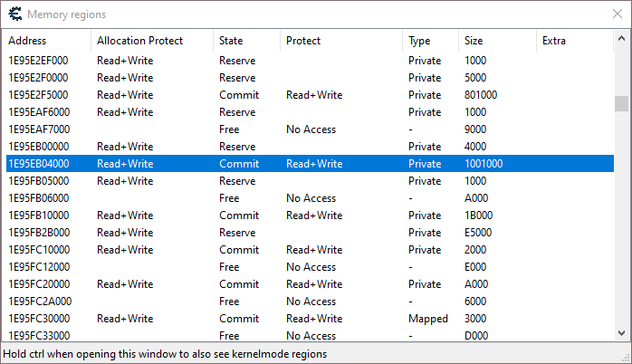
and guess what my dosbox conf says?
memsize=16 (mb)
memsize=16 (mb)
so my script could launch DOSBox, then enumerate the memory regions allocated, and find the one that's 16mb, and that's the DOS RAM!
okay I confirmed this works manually. I can find the new DOS-RAM section, add 2304500 to it, and I get the x-pos of the cursor.
now to do it automatically.
I was kinda hoping there was an API that let me point at a process and go "hey what memory regions does this have mapped?"
NOPE
I looked up how cheat engine does it.
it's pretty simple.
you start at 0, and call VirtualQueryEx at that address.
it's pretty simple.
you start at 0, and call VirtualQueryEx at that address.
then you increase your pointer by the size of the region you found there, and try again.
so you just call VirtualQuery repeatedly on a ton of memory addresses.
why not
windows is one of the most operating systems in all the world
 mmu_man