

How to tip your server admin:

You need the 'About' page of your server, which will link to the person running it, and often, how to donate. If not you can ask them. So, how do you find the 'About' page?

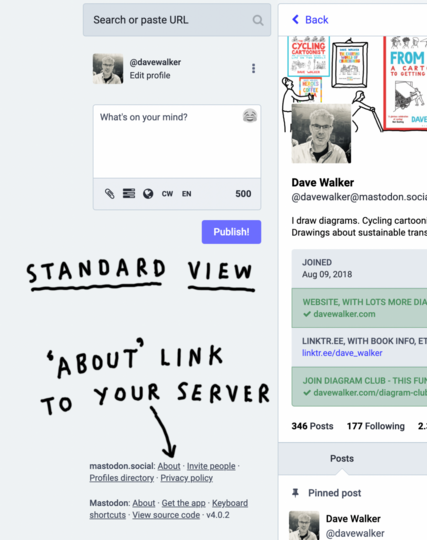
In standard view (in a browser, not an app) look for the 'About' link on the bottom left of the screen (image below).

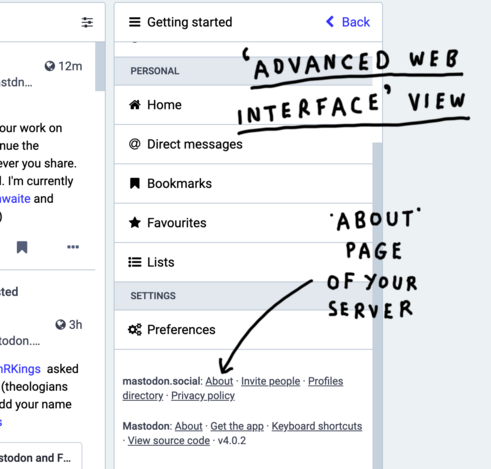
In 'advanced web interface' view click the three lines, top left, to bring up 'getting started'. The link is on the bottom of the list (you might need to scroll) (second image)
@davewalker I've found that the About page is also useful for those outside of that instance to see who is running it, their posting policies and Rules of Conduct, etc, so you can see if they stray from your own values.
@davewalker Done. ;) Thanks for the tip.
@davewalker
I access mainly with the Metatext app on iPad, where I can’t find a route to donation info, but if you have the Mastodon app for iPad (similar for Android?) you can get there via settings (cogwheel symbol ⚙️ at l/h of home screen) which brings up a pop-up Settings screen. Scroll down to Terms of Service, then *** About, then scroll down until you find something like “Support the Community”. Your admin will tell you there which portals are available for donations.
@davewalker But please don't tip your server.
@davewalker I made a $25 donation to fosstodon.org as soon as I created my account. I appreciate having an option to Twitter.