Some ways to reduce clutter.
- Use filters.
If terms like blockchain, bitcoin, elon, etc tire/trigger/annoy you, filter them out. One of the first filters I set up was to mute ‘RT.’
- Make lists, and pin the ones that matter.
There will be some people you want to hear from regularly, others not so much.
- Mute
You can mute people for limited periods or indefinitely.
- Limit some stuff
Like, if someone you follow is boosting too much or boosting things that don’t interest you? Go to their profile, click on the three dots next to their name, and ‘Mute Boosts.’
You can’t have your handle verified. But you can verify yourself as the *owner* of the links in your profile.
That is, you can add a bit of code in your blog / personal site etc. (‘Edit profile,’ then scroll down to ‘Profile metadata’ to see how to do that.)
You mostly won’t be able to do that for sites you don’t control, like say your author page in a media site, or your Instagram.

PSA
https://pruvisto.org/debirdify/ & https://fedifinder.glitch.me are good ways to find whether your Twitter followers/following/lists are in the Fediverse / Mastodon.

BUT ONLY IF they have what looks like Fediverse account names in their Twitter information (display name, bio, website, pinned tweet)

(You will need to give them access to your Twitter, like you do with other services, like Tweetdeck. You can revoke that access immediately you are done.)

Debirdify

This is a web app that helps you find out which of the people you follow on Twitter are on Mastodon/in the Fediverse already and follow all of them easily.

Three ways to be more inclusive.

Use CamelCase / MedialCapitals or snake_case or A_Combination_Of_Both in your hashtags. (Mastodon users seem to prefer CamelCase.) Makes them comprehensible to screenreaders used by folks with limited or no vision and WithMoreComplexMultiwordHashtags, easier for everyone.

Use alt text / image descriptions [edit image > describe for the visually impaired]

Use CW (content warning) for anything that could be triggering / NSFW / very long / boring.

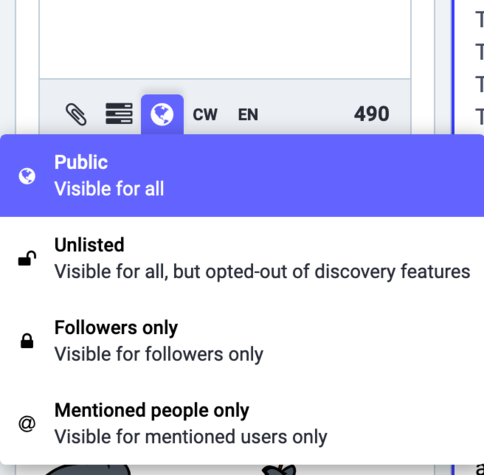
Many more experienced Mastodon users suggest that when posting a long thread, it is good manners to mark the posts after the first one as ‘Unlisted’ rather than ‘Public’ so that you don’t clutter the timeline of your followers.

(I did not choose the ‘Unlisted’ option for this post because while it is a thread, the posts have longish time gaps between them, and so will not all appear together on your timeline.)

Favourite isn’t exactly like a Twitter Like: Mastodon does not show you a post because lots of people liked it. Only the Original Poster gets notified (anyone else would have to go see that post and then see who has favourited it), so this works only to tell the OP that you liked their post.

Your Bookmarks are private to you. No one else can see them.

Boosts, the equivalent of Retweets, show up to your followers. Boost judiciously!

There is no Quote Tweet equivalent. : )

When you’re sharing your Mastodon ID on other platforms, the “@ zigzackly @ mastodon . social” format (without the spaces I have used here) can be interpreted by that interface as an email address or a handle on THAT platform.
The full URL format — https://mastodon.social/@zigzackly/ — works better.
When sharing a link here, it’s good form to also include a bit about why you’re sharing it, even a short quote from it (or, if you notice the link doesn’t show a preview, edit your post to at least add the headline in your text).
@zigzackly Is CW flag true for also political posts as well?
@tckb I think so. Especially if you’re in an instance that is not explicitly for politics.
( : in my head, electoral politics falls under triggering, boring. : )
@zigzackly I haven't any explicit inclusion or exclusion in few servers so that's a bit confusing for the birdexpats like me :P
@zigzackly CW also useful for things w/many emojis, wordles etc, so that ppl with screenreaders can avoid them
@lime_green_gnome You’re right of course. Didn’t think of those because I tend not to do too many emojis, and I don’t see to many in my timeline.
@zigzackly Thank you for this. This thread is incredibly helpful.

@zigzackly
Thanks for helpful hints

After a rush of joining and following, had to take a few days away .

Coming back and working how to add here a a positive part of my new world..

@mojosue Happy to be have been of help. : )