A thread for Internet users who want to protect their online privacy and personal activity data.
How to protect yourself from snooping by govt or any agencies or individuals.
(1). Avoid using Chrome. Because google is known for the biggest user data collector in Internet, Google using all of it's tools to collect personal data of users as much as possible. Then google use those data to make profile of user and people around them google make timeline of your every activity and use them to show you specifically target ads to you. You can use other browser which provide better privacy protection then chrome. Some of them is Mozila, Brave, duckduckgo, Tor
(2). If you can't leave chrome you must make some changes on your chrome settings, So you can have some control on your data.
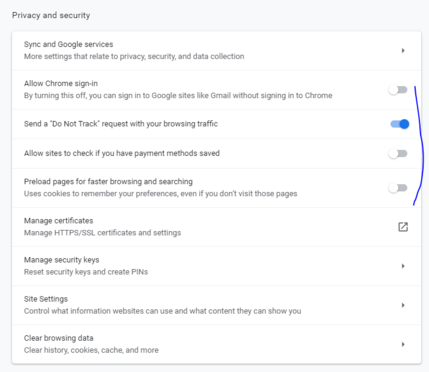
a). Do not leave your gmail account logged in on chrome always this way google will be tracking you every where.
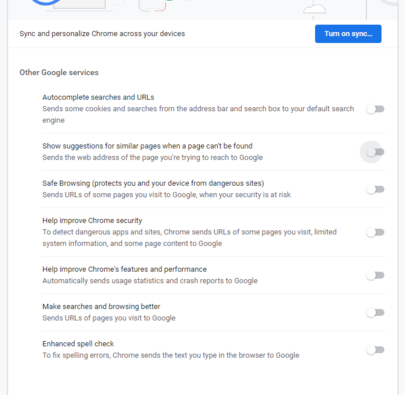
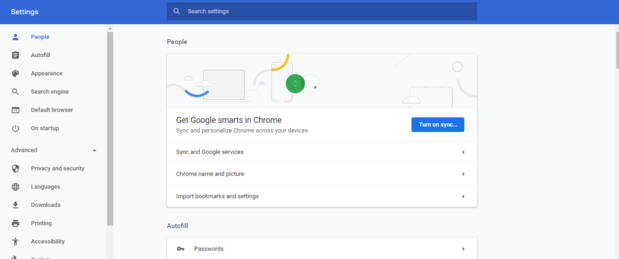
b). Keep Google smart data sync off (see screenshot).
c). Keep all the google services off as per screenshot I have attached.
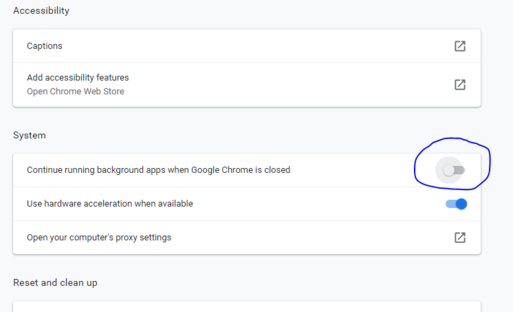
d). Keep off continue running of chrome app on background when google chrome is closed. (see screen shot).
e). Change your chrome privacy and security to the screenshot i have attached.
f). Clear your browsing data more frequently or you can clear every time before closing browser some browser support automatic data clear on closing activate this option if available.
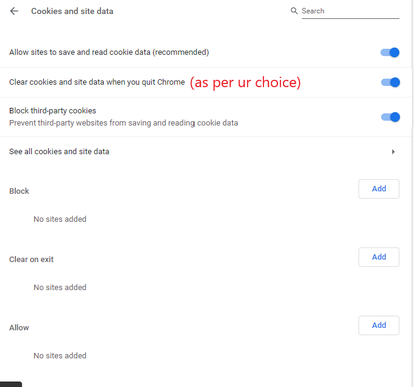
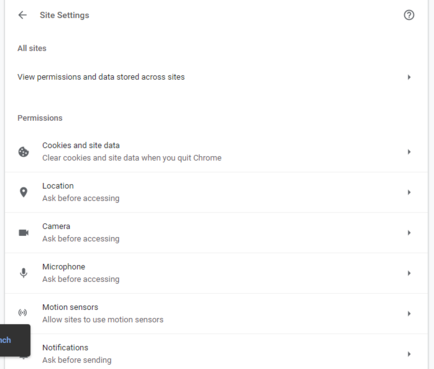
g). Click on the site setting>cookies and site data and make changes like i have suggested. (screenshot).
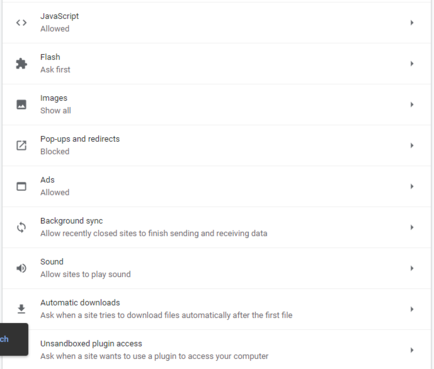
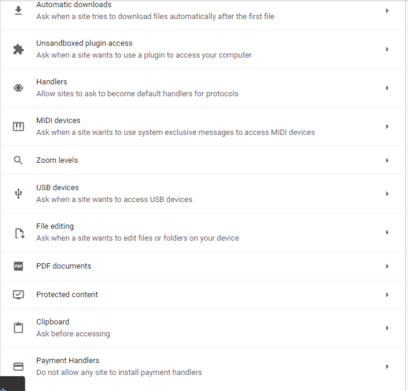
See more screen shots i have attached below for site settings.
one more screenshot
@the_robot or one can use opera browser with inbuilt vpn to protect their privacy.
(3). Stop using google.com as your default search engine instead of that use other search engine which doesn't track your every search query. Suggested Duckduckgo.com or you can use any other as per your choice. Try to be less dependent on google search.
(4). Google and other analytic company follows you on every site you visit. So you can block them by using Duckduckgo browser extension, available for almost every browser. Which will block all known trackers from site & also shows site ratings
@the_robot I am using Duckduckgo.com from last one year. Even I am using it in phone as well. It's really helpful.

(5). Learn what is Tor browser and how to use it. Download Tor browser from official site only. https://www.torproject.org/

(6). Use a good VPN. There is 100s of vpn available in the market. Do proper research about vpn you are going to buy. Do not use free vpn.
(7). Always use VPN when you are using wifi from public places or hotel or while traveling anywhere.
(8). To make your VPN more effective change your system time to the timezone of the location you are going to use on VPN.

The Tor Project | Privacy & Freedom Online

Defend yourself against tracking and surveillance. Circumvent censorship.

(9). Use multiple browsers. One for research and sensitive work like online banking, another for shopping (Always use incognito mode while you searching and product on eCommerce), Do not let eCommerce companies or other trackers to know your search history.
(10). Do not use browser extension which offers you discount on products and provide you time to time product sell alert. These kind of extension can monitor your online behavior.
(11). Use incognito mode while searching on google.

(12). Use a good antivirus which can detect keylogger, malwares and other viruses.
keylogger:https://bit.ly/2owJH3Z
Malware: https://en.wikipedia.org/wiki/Malware

(13). Advanced users can use firewall management software for better protection.

(14). Do not use free software or cracked, hacked software except for the famous one like VLC media player or skype or teamviewer like apps.

(15). Keep your all apps updated and latest version installed.

Keyloggers - What is a Keystroke Logger?

What is a keylogger and how do you check if you have one on your system? Read all about keystroke loggers, anti keylogger protection, and how to remove a keylogger if your scanner/scan shows your system is infected with keylogger spyware.

(16). Prefer iPhone over Android if possible. (Do not debate here on my thread about this. First do own research. I am saying this after lots of research and experience).
(17). On Iphone keep backround usages of apps off and do not give access to your contact msg and notification access to every app.
(18). Hacking an iPhone remotely is very hard (Not impossible) but most of the iphone hack is done by physical contact (possible In 10-30sec), So be careful with whom you sharing your mobile.