
Helo @mlsteele, pease help me.

I've just created a #keybase account: https://keybase.io/salimrezanewton.

But, while trying to install the Linux (Mint 18.3) app I was caught into troubles.

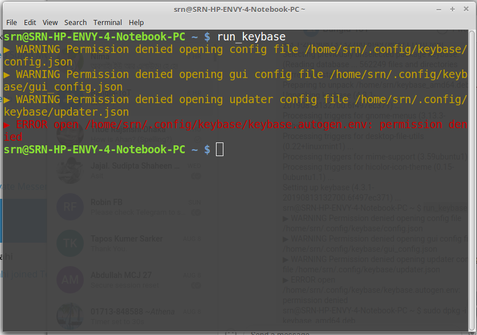
It's (perhaps) installed but not running. When I run "run_keybase", the TERMINAL shows the followin error (I don't actually understand the command line):

srn@SRN-HP-ENVY-4-Notebook-PC ~ $ run_keybase
▶ WARNING Permission denied opening config file /home/srn/.config/keybase/config.json

(continued to the coment field)
salimrezanewton (Salim Reza Newton) | Keybase

salimrezanewton (Salim Reza Newton) is now on Keybase, an open source app for encryption and cryptography.

@mlsteele

▶ WARNING Permission denied opening gui config file /home/srn/.config/keybase/gui_config.json
▶ WARNING Permission denied opening updater config file /home/srn/.config/keybase/updater.json
▶ ERROR open /home/srn/.config/keybase/keybase.autogen.env: permission denied
srn@SRN-HP-ENVY-4-Notebook-PC ~ $

(continued to the screenshot below)

@salimrezanewton Hi Salim, could be your ~/.config folder is not owned by you. Here's a github issue from another user showing similar errors https://github.com/keybase/client/issues/15233 .

Ensure that ~/.config is owned by you. Or if you're not familiar with how to do that, please send the output of `stat ~/.config`.

Error starting keybase · Issue #15233 · keybase/client

Hi, Just installed under non-root user using instructions provided on keybase site. Install went fine. When I did run_keybase I got: steve@upcloud1:~$ run_keybase ▶ WARNING Permission denied openin...

@mlsteele I opened the folder as the root and changed the permissions. Now Keybase is running. Is that okay?
@salimrezanewton Great! Yes, if it works now that seems like a good solution. Curious what application made that ~/.config folder with the wrong permissions. But it's probably hard to tell.
@salimrezanewton Actually this was a bug in Keybase's postinstall script that created .config/keybase with root permissions. For anyone else who comes across this thread. The bug is fixed in the latest version v4.3.2. For those already affected `run_keybase` should tell you what to do. You may need to run `sudo chown -R $(whoami):$(whoami) $HOME/.config`

@mlsteele My Keybase app (Linux Mint 18.3) has been running well. As I tod you, I have manually right clicked the Keybase folder inside the .config folder to make it "open as root", and then change the permissions.

Should I still run `sudo chown -R $(whoami):$(whoami) $HOME/.config`?

@mlsteele Well, I ran it right now.

Terminal showed no error. In fact it showed nothing.

Is that Okay?

@mlsteele Yes, I have no idea actually. I know little about it.