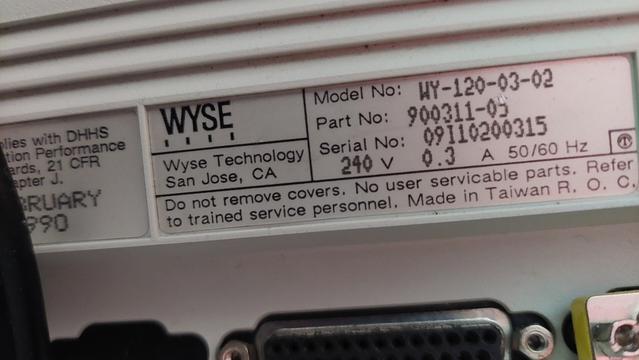
Hi #hivemind, has anyone got the #Wyse WY-120 #serial #terminal to work correctly on #Linux with any #terminfo entries? Specifically, it has trouble with backspace/delete, arrow keys and general #curses page layout. #Halp?

PS: I've seen @veronicaexplains's wonderful video on the WY-55 but this one unforunately seems to have different behaviour.

#retro #retrocomputing #serialport #serialcommunications #termcap #tty #ttyusb #rs232 #ncurses

A Gaggle of Boards Makes For an I2C Playground

It's not much of a stretch to assume that the majority of Hackaday readers are at least familiar with I2C. In fact, there's an excellent chance that anyone who's ever done more with an Arduino than blink the onboard LED has at one time or another used the serial communication protocol to talk to a sensor, display, or other external gadget. Of course, just because most of us have used it in a few projects doesn't mean we truly understand it.

If you're looking to brush up on your I2C knowledge, you could do worse than to follow the guide [András Tevesz] recently wrote up. With a title like Hardware Hacking 101: E01 I2C Sniffing, How to Listen to Your Arduino 's I2C Bus, you know you're in for a good time. While the document is arguably geared more towards security researchers than electronic hobbyists, the concepts presented can be useful even if you're just trying to debug your own projects.

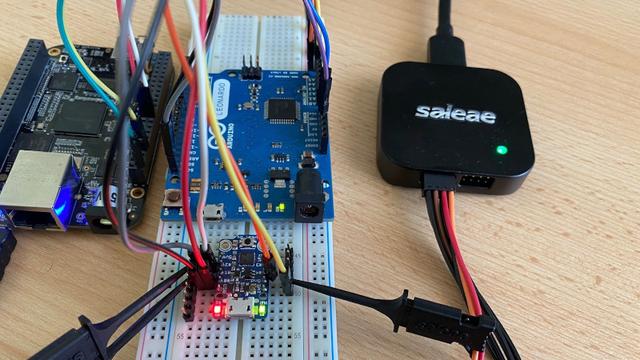
While you could certainly adjust the hardware used to fit whatever you've got kicking around the parts bin, the setup [András] details uses a BeagleBone Black as the master device that communicates with an Adafruit Trinket and Arduino over I2C. He provides code for all three devices, and when everything is running as it should be, the microcontrollers will blink their LEDs in time with signals being sent out over the bus by the BeagleBone.

This, in itself, has educational value. Sure most of us have used turn-key I2C devices, but how many have actually made one? But beyond that, it also gives you a simple and user-controllable bus to poke around in. [András] hooks up a Saleae logic analyzer (never fear, that $10 USD one you got on eBay will work just as well) and studies the actual messages as they go over the wire. If you've ever wanted to take a close look at the nuts and bolts of this ubiquitous protocol, it's a great way to get your foot in the door. While on the subject, be sure to check out the excellent guide our own [Elliot Williams] wrote up back in 2016.

[Thanks to zh4ck for the tip.]

#parts #softwarehacks #i2c #logicanalyser #serialcommunications #sniffing

Giving Control Of A Smartphone Robot To A Raspberry Pi

Most gadgets that interface with smartphones have a rather short lifespan and inevitably end up as E-waste. Unless hackers give them a second life, as is the case with the Romo, a little smartphone-controlled robot. [David Goeken] has successfully reverse-engineered the communication protocol to allow the Romo to controlled Raspberry Pi (or microcontroller)

The Romo was a little iPhone-controlled robot brought to market with a Kickstarter campaign back in 2013. It originally used the audio jack from the iPhone for the control interface, but was quickly followed by an updated version that used iPhone 4's 30 pin connector and later the Lightning port. Romotive, the company behind Romo, eventually went out of business, but fortunately, they open-sourced the IOS app and the firmware. This has led to a few third-party apps currently on the app store.

[David] wanted to use other hardware for control, so he set about reverse-engineering the protocol using the open-source software and a logic analyzer. Unsurprisingly, it uses a serial interface to send and receive commands, with two additional pins to detect the connection and wake up the Romo. After breaking out the interface header on the board, he was able to modify the Romo to mount a Raspberry Pi Zero, and power it using the internal battery.

[David] has not made his code public yet, but it sounds like he plans to. It looks like Romo's can be a fun little experimentation platform, and they can be found for cheap on eBay. We covered another cool Romo hack back in 2014, which used a projector and vision system to create a Mariokart-like game. For a completely open-source smartphone robot, check out the OpenBot.

#robotshacks #robot #romo #serialcommunications #smartphone

Giving Control Of A Smartphone Robot To A Raspberry Pi

Most gadgets that interface with smartphones have a rather short lifespan and inevitably end up as E-waste. Unless hackers give them a second life, as is the case with the Romo, a little smartphone…

Hackaday