WE AND THE COLOR
These Adobe Illustrator Liner Brushes Replicate the Real Feel of Fine Liners
Fineliners are personal. Ask any illustrator, pattern designer, or sketchbook obsessive, and they’ll tell you exactly which pen they reach for first—a Uni PIN 0.1, a Pigma Micron 05, or maybe a Winsor & Newton Fineliner for those slow Sunday afternoons. The tool matters. Its weight, its drag, its ink consistency—all of it feeds into how a line feels and, ultimately, how a drawing thinks.
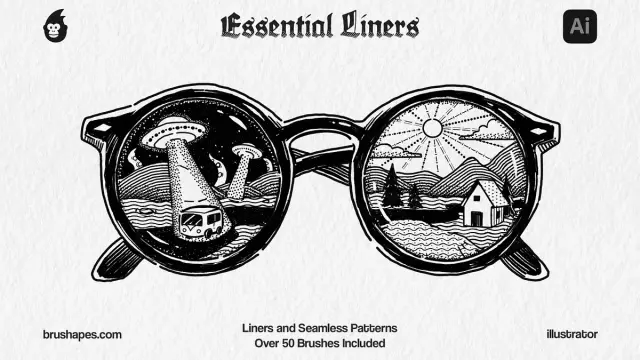
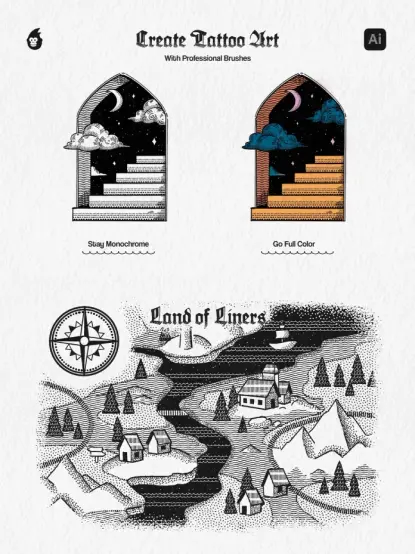
So when a digital brush set claims to replicate that experience inside Adobe Illustrator, the claim deserves scrutiny. The Adobe Illustrator liner brushes from brushapes.com do more than approximate the fine-liner aesthetic. They reconstruct it, systematically, across eight ink liner brushes, eighteen seamless pattern brushes, eight stipple brushes, and eighteen pattern line brushes—fifty-two tools in total, all vector-based, all built for artists who already know what a fine liner feels like in their hand.
This set lands at a moment when demand for analog-feeling digital tools is genuinely accelerating. Designers are tired of the sterile precision of default vector tools. They want friction, texture, and lines that breathe. This brush set addresses exactly that.
Download the brushes for a low budget from Creative Market.Please note that these brushes require Adobe Illustrator installed on your computer. You can get the latest version from the Adobe Creative Cloud website. Just have a look here.
Adobe Illustrator Essential Liner Brushes Download the brushes for a low budget from Creative Market.Why Are Illustrators Moving Toward Fine Liner-Style Digital Brushes?
The answer is simpler than it sounds. Screen fatigue is real, and so is the backlash against overly polished, clean-vector aesthetics that dominated the 2010s. Today’s design landscape rewards handcrafted warmth and visible process. Clients want work that looks made, not generated.
Fine-liner illustration has surged across editorial design, packaging, surface pattern, and brand identity. The scratchy confidence of inked lines—the kind you see in zine culture, botanical illustration, and architectural sketching—has become commercially desirable again. Designers need tools that deliver that look at scale, without scanning physical drawings or fighting Photoshop brushes that lose quality on resize.
That’s the structural advantage of this particular set. Because all brushes are vector-based, they scale infinitely without degradation. You draw at icon size or billboard size—the line holds. That’s something no scanned liner brush can promise.
The Anatomy of a Good Ink Liner Brush in Illustrator
Most designers who use Illustrator brushes never dig into what separates a functional brush from a great one. Here’s what actually matters.
Pressure response determines whether a brush feels alive or mechanical. Ink texture governs whether the line looks deposited on paper or painted on glass. Edge definition controls the visual “weight” of every stroke. And consistency across speed variation decides whether the tool behaves naturally or fights you mid-line.
The brushapes.com liner set addresses each of these variables deliberately. The eight ink liner brushes replicate the pressure-to-width logic of physical liners. The stipple brushes—eight in total—bring a granular, ink-deposit quality that’s notoriously difficult to fake in vector environments. Together, they cover the full expressive range of physical fine-liner work, from tight architectural detail to loose gestural sketching.
What’s Inside the Adobe Illustrator Liner Brush Set
Let’s be specific. Vague descriptions of brush sets waste everyone’s time. Here’s exactly what’s included and why each component matters.
8 Ink Liner Brushes
These are the core tools. Each brush simulates a different liner weight and ink behavior, from hairline traces to bold expressive strokes. They behave predictably at varying speeds, which is the key differentiator from lower-quality brush packs. Use these for outlines, contour drawing, illustration borders, and any work where line quality is the primary visual language.
18 Seamless Pattern Brushes
This is where the set becomes genuinely unusual. Seamless pattern brushes in Illustrator apply repeating, path-aligned motifs along any vector stroke. These eighteen brushes let you draw a path and simultaneously generate a textured, patterned line—useful for decorative borders, textile design mockups, surface pattern development, and editorial illustration. The count alone—eighteen distinct patterns—gives this set a depth that most competing packs don’t approach.
8 Stipple Brushes
Stippling is one of the most underused techniques in digital illustration. It builds tonal value through dot density rather than shading or gradient, producing a distinctly analog quality. These eight stipple brushes bring that logic into Illustrator’s vector environment. They’re particularly effective for scientific illustration, vintage-style design, and any work that needs rendered depth without photographic reference.
18 Pattern Line Brushes
Distinct from the seamless pattern brushes, these tools generate textured line strokes rather than repeating motifs. Think crosshatching, parallel grain lines, interrupted dashes, and organic texture fills—all produced with a single stroke. Pattern line brushes are essential for background texture, shadow rendering, and any composition that needs visual density without color.
The Three-Layer Liner Framework: How to Think About This Brush Set
Here’s an original framework for understanding how these tools work together. Think of the set as operating across three distinct layers of mark-making: the Foundation Layer, the Texture Layer, and the Pattern Layer.
The Foundation Layer uses the eight ink liner brushes to establish primary linework—outlines, contours, and expressive gesture strokes. This is your primary drawing layer, where line quality carries the most visual weight.
The Texture Layer uses the stipple brushes to build tonal depth, surface rendering, and value gradients through dot density. Applied over foundation linework, stipple strokes give illustrations a dimensional, hand-rendered quality that flat vector fills cannot replicate.
The Pattern Layer uses the seamless and line pattern brushes to add surface complexity—decorative borders, texture fills, and repeated motifs. This layer transforms technical illustration into designed illustration, bridging the gap between fine art and graphic design.
Working across all three layers produces results that read as genuinely analog. The Three-Layer Liner Framework is not just a workflow tip. It’s a structural argument for why this set is more versatile than single-category brush packs.
Who These Adobe Illustrator Liner Brushes Are Built For
The product description from Creative Market calls this set “universal and advanced.” That phrasing is accurate but worth unpacking. Universal means the entry point is accessible—if you’ve used Illustrator brushes before, you can pick these up immediately. Advanced means the ceiling is genuinely high.
Pattern designers will find the seamless and pattern line brushes immediately useful for developing hand-drawn textile and surface design work. Editorial illustrators will lean on the ink liner and stipple brushes for character work and compositional linework. Architects and product designers who sketch digitally will appreciate the precision and scalability of the liner brushes. Brand designers building illustrated identity systems will use the entire set to establish a consistent hand-drawn visual language.
The set also works well for doodle artists transitioning from paper to screen. If you’ve spent years building pattern work with physical Uni PINs or Microns, this set replicates enough of that tactile logic to make the transition feel natural rather than clinical.
Compatibility and Technical Requirements
These brushes are built for Adobe Illustrator. They are vector-based, which distinguishes them from raster brush sets designed for Photoshop or Procreate. Vector brushes in Illustrator maintain clean edges, unlimited scalability, and full editability. You can adjust stroke weight, color, and opacity after the fact without any quality loss.
The set includes a how-to-use video and written text guidelines, which matter more than they might seem. Illustrator’s brush panel has a learning curve. The included documentation accelerates the setup process and ensures you’re using the brushes as intended rather than improvising.
The Ink Consistency Principle: Why Vector Liner Brushes Outperform Raster Alternatives
Here’s a principle worth naming explicitly: the Ink Consistency Principle. In physical liner work, ink consistency is non-negotiable. A line that varies in coverage, bleeds unpredictably, or loses definition at fine widths is a failed tool. The same standard applies to digital liner brushes.
Raster brushes fail the Ink Consistency Principle at scale. Zoom into a raster liner stroke at 400%, and you’ll see pixel degradation, blurred edges, and a loss of the crisp ink-deposit quality that defines fine liner work. Vector brushes maintain clean geometry at any magnification because they’re defined mathematically, not by pixel arrays.
The brushapes.com set applies this principle across all fifty-two tools. Every brush produces consistent, scalable strokes. This makes the set practically essential for any workflow where output size varies—illustration for both screen and print, for instance, or pattern design that needs to work at both textile scale and repeat tile scale.
Practical Workflows: Getting the Most from These Liner Brushes
Start with the ink liner brushes for any project that involves primary linework. Set your stroke weight before drawing—unlike raster brushes, vector brush appearance responds to both the brush itself and the stroke weight setting in the toolbar. Experiment with the weight slider to find the combination that matches your intended liner thickness.
For stipple work, build value gradually. Apply the stipple brushes in multiple passes, increasing stroke density in shadow areas. This mimics the physical technique of stippling, where tonal depth comes from patience and layering rather than a single heavy application.
Use the seamless pattern brushes on closed paths for decorative border effects. Apply them to open paths for textured line strokes within compositions. The eighteen options give you enough variety to develop a distinctive visual language without sourcing multiple packs.
Layer pattern line brushes under primary linework to create depth and visual texture in background areas. This technique—combining foundation linework with pattern texture layers—is particularly effective for editorial illustration, where compositions need to hold interest across large print formats.
Organizing the Brushes in Your Illustrator Library
Fifty-two brushes is a serious collection. Build a custom brush library file and organize the tools into four labeled groups: Ink Liners, Stipple, Seamless Pattern, and Pattern Lines. Save this as a dedicated .ai library file and load it via the Brushes panel menu. This keeps your workspace clean and makes the tools immediately accessible across projects.
The Future of Fine Liner Aesthetics in Digital Design
The appetite for analog-feeling digital tools is not a passing trend. It reflects something structural: the cultural preference for visible craft in an era of AI-generated smoothness. As generative tools flood the market with frictionless, technically perfect visuals, hand-drawn aesthetics will continue to carry premium signal value.
Fine-liner illustration will become a deliberate stylistic choice rather than a default skill. Designers who build fluency with tools like this brush set—who can produce convincing, expressive liner work in a fully scalable, print-ready vector format—will hold a distinct competitive position. The technical barrier isn’t high. But fluency takes practice, and the tools matter.
Download the brushes for a low budget from Creative Market.The brushapes.com liner set is positioned exactly where that demand is growing. It brings physical fine-liner logic into Illustrator’s vector environment without compromise. For designers who care about line quality, that’s a meaningful offer.
Frequently Asked Questions
What software do these liner brushes work with?
These brushes are designed exclusively for Adobe Illustrator. They are vector-based and use Illustrator’s native brush engine. They are not compatible with Photoshop, Procreate, or other raster-based applications.
How many brushes are included in the set?
The set includes 52 brushes in total: 8 ink liner brushes, 18 seamless pattern brushes, 8 stipple brushes, and 18 pattern line brushes. A how-to-use video and written text guidelines are also included.
Are these brushes suitable for beginners?
Yes. The included documentation and how-to-use video make the setup accessible for Illustrator users at any level. That said, the set has enough depth and variety to serve advanced illustrators and professional designers as well.
Can I scale my artwork without losing brush quality?
Yes. Because all brushes are vector-based, they scale infinitely without quality loss. You can work at any resolution or output size and the linework will remain crisp and clean.
What is the difference between the seamless pattern brushes and the pattern line brushes?
The seamless pattern brushes apply repeating decorative motifs along a path, producing ornamental or patterned border effects. The pattern line brushes generate textured strokes—such as crosshatching or grain lines—rather than repeating motifs. Both types add surface complexity to linework, but they operate differently and suit different applications.
Are these brushes good for surface pattern design?
Yes. The seamless pattern brushes are especially useful for surface pattern development. Combined with Illustrator’s pattern-making tools, they enable complex hand-drawn textile and repeat design work entirely within the vector environment.
Who makes these brushes?
These Adobe Illustrator liner brushes were created by the team at brushapes.com and are available on Creative Market.
What file formats are included?
The set includes vector brush files compatible with Adobe Illustrator, along with a how-to-use video and written guidelines to help you install and use the brushes effectively.
Browse WE AND THE COLOR’s Illustration and Templates categories for more.
#adobeIllustrator #digitalDrawing #illustration #illustratorBrushes #IllustratorLinerBrushes