WE AND THE COLOR
Framed Poster Photoshop Mockup: Showcase Your Art in a Stylish Living Room
Most designers undersell their work before it even reaches a client. The art is there. The vision is there. But the presentation? That part breaks the spell. A well-crafted framed poster Photoshop mockup changes everything — it places your artwork inside a real, tangible world. It tells a story. And this particular mockup by The Rose Project tells it beautifully.
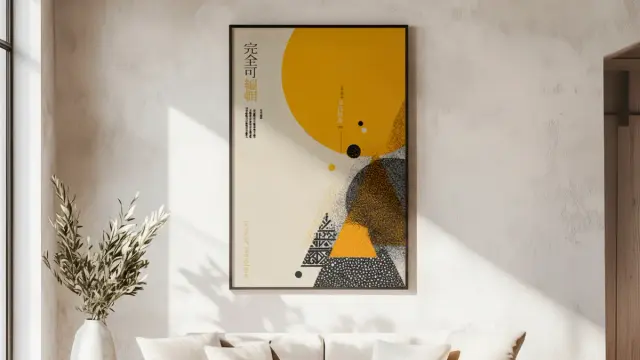
The mockup renders at 2000 x 2000 px, and the setting is a Scandinavian-influenced living room with natural light, textured plaster walls, and carefully chosen furniture. Nothing screams for attention. Instead, everything pulls focus toward the framed poster on the wall — exactly where it should be.
Download the mockup from Adobe StockPlease note that these templates require Adobe Photoshop. The latest version can be downloaded from the Adobe Creative Cloud website; visit this link.
Framed Poster Photoshop Mockup by The Rose Project to Showcase Art in a Stylish Living Room. Download the mockup from Adobe StockWhy Does Your Art Presentation Matter as Much as the Art Itself?
Context is everything in visual communication. A poster floating on a white background tells you almost nothing about how it will feel in a real environment. A framed poster Photoshop mockup situated inside a living room, however, tells you everything. It shows scale, atmosphere, and emotional resonance at a single glance.
Clients cannot always imagine spatial relationships. They need to see it. Buyers of art prints, poster designers, and illustrators all face the same challenge: the gap between creation and comprehension. A photorealistic poster mockup bridges that gap instantly. This is why presentation design has become as important as the design itself.
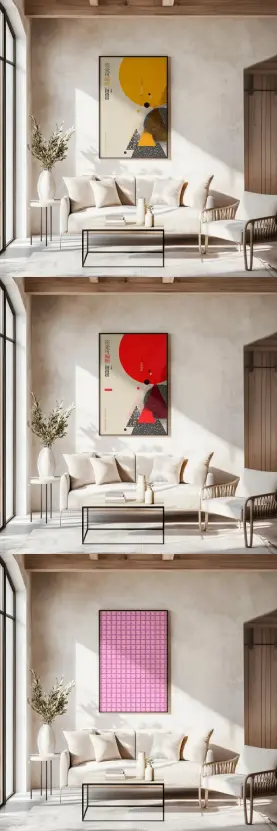
Consider the three variations shown in this mockup. A bold yellow-and-black abstract composition reads as sophisticated and editorial. A vibrant red-and-cream design shifts the room’s mood entirely toward drama. A pastel pink geometric grid brings softness and a gallery-like calm. Same room, same frame — completely different emotional registers. That range is exactly what makes a quality framed poster mockup so valuable as a creative tool.
The Rose Project Living Room Mockup: What Makes It Stand Out
The Rose Project built this framed poster Photoshop mockup with thoughtful restraint. The room features creamy linen sofas, a sleek black steel coffee table, and an olive branch in a white ceramic vase. Everything is warm, considered, and intentional. This is not a generic stock-photo interior. It feels like a real home — specifically, the kind of home your best clients aspire to live in.
The 2000 x 2000 px square format suits both desktop and social media platforms equally well. Instagram posts, portfolio pages, and client pitch decks all benefit from this versatile ratio. Additionally, the high resolution ensures crisp, publication-ready results regardless of output size.
Natural light streams in from a tall arched window on the left. That directional light source creates realistic shadow behavior on the poster frame, which is critical. Cheap mockups ignore lighting physics entirely. This one does not. The result is a wall poster mockup presentation that reads as genuinely photorealistic.
The Contextual Resonance Framework for Mockup Selection
Not every mockup suits every artwork. I use what I call the Contextual Resonance Framework to evaluate fit. This framework asks three questions. First, does the room’s palette complement or fight the artwork’s colors? Second, does the room’s mood amplify or dilute the artwork’s emotional intention? Third, does the frame style honor or overwhelm the artwork’s visual weight?
This living room mockup scores exceptionally well across all three dimensions. The neutral plaster walls serve as a responsive backdrop rather than a competing element. The organic, warm interior styling complements both bold graphic art and delicate illustrations equally. And the clean black frame adds just enough structure without imposing.
How to Use and Customize This Framed Poster Photoshop Mockup
Using this framed poster Photoshop mockup requires minimal technical knowledge. Open the file in Adobe Photoshop. Locate the designated Smart Object layer in the Layers panel. Double-click the Smart Object thumbnail to open the embedded canvas. Paste or drag your artwork into that canvas. Save and close it. Photoshop automatically maps your design onto the frame in the mockup scene.
That process takes under two minutes. Furthermore, if you want to swap in a second design to show a client variations, you simply repeat the Smart Object replacement. There is no need to reposition, resize, or adjust perspective manually. The mockup handles all of that for you.
Customization Options Worth Exploring
Beyond the basic Smart Object replacement, experienced Photoshop users can push further. You can adjust the room’s overall color temperature using a Color Balance or Hue/Saturation adjustment layer above the entire composition. This lets you shift the scene from warm afternoon light toward a cooler, more Nordic aesthetic, depending on your brand’s needs.
You can also experiment with the Multiply and Overlay blend modes on texture layers to vary how much the plaster wall grain shows through the mat board around the poster. These small details add credibility to your poster presentation mockup. They push it from “looks like a mockup” to “looks like a photo.”
Additionally, if you are preparing assets for a print-on-demand portfolio or an art print shop on platforms like Etsy or Society6, this mockup directly supports your product listing photography. Buyers respond strongly to room context shots because they reduce purchase hesitation.
Why Photoshop Remains the Gold Standard for Mockup Customization
Many alternatives to Photoshop exist. Canva, Figma, and browser-based tools all offer mockup features. Yet none of them match Photoshop’s non-destructive editing workflow, Smart Object precision, or color management capabilities. When you work with a framed poster Photoshop mockup inside Adobe’s ecosystem, you retain full creative control at every stage.
Photoshop’s Smart Objects preserve your artwork at its original resolution. You can scale it up, scale it down, and return to your original file without any quality loss. That matters significantly when you are producing assets for both social media and large-format print at the same time.
Photoshop also integrates directly with Adobe Creative Cloud Libraries. Consequently, brand assets, color swatches, and logos remain accessible across your entire project without redundant file management. For professional designers working on client presentations, this integration saves considerable time and reduces errors.
The Presentation Gravity Principle
I describe the advantage of high-quality mockups using what I call Presentation Gravity. Simply put: a stunning presentation pulls viewer attention and trust downward toward the work, rather than leaving the work floating in an abstract vacuum. Strong mockups create Presentation Gravity. Weak ones create Presentation Friction.
This particular framed poster Photoshop mockup generates significant Presentation Gravity. The living room environment is aspirational without being unattainable. It feels editorial enough to satisfy premium art collectors, yet accessible enough to connect with everyday buyers. That balance is rare and genuinely valuable.
Who Benefits Most from This Living Room Poster Mockup
Illustrators presenting work to gallery clients gain immediately from this mockup. Art directors building campaign mood boards can place print concepts into a life-like domestic setting. Independent artists selling prints on Etsy or their own Shopify stores can use it as their primary product listing image. Brand designers validating poster and packaging concepts for client approval calls find it equally useful.
Even interior designers use wall art mockups to preview artwork placement for renovation projects before ordering prints. The use cases are remarkably broad. The common thread is this: anyone who needs to communicate how a printed piece looks in a real room benefits from a photorealistic framed poster Photoshop mockup like this one.
Practical Tips for Getting the Most Out of Your Mockup
Start with artwork that already exists at a high enough resolution. Ideally, your source file should be at least 300 dpi at the intended print size. Lower resolution files will look soft in the Smart Object, even though the mockup itself renders at 2000 px. The mockup will not compensate for a blurry source file.
Pay attention to your artwork’s aspect ratio before dropping it into the Smart Object. The frame in this mockup is oriented vertically. Horizontal artwork will require cropping or repositioning within the Smart Object canvas. Plan accordingly so your composition fills the frame intentionally rather than accidentally.
Finally, consider producing multiple export variations from the same mockup session. One version with your artwork, one with a simpler color block to show the frame and room context alone, and one with a styled overlay for social media captions. Each serves a different distribution channel and extends the value of a single mockup file considerably.
Forward Look: Where Mockup Design Is Heading
Mockup design is moving toward hyper-contextual environments. Generic white-wall studio mockups are losing relevance rapidly. Designers and buyers now expect to see artwork positioned inside fully realized, architecturally coherent spaces. This shift mirrors broader trends in experiential retail and immersive digital content.
AI-generated mockup environments are also entering the market. However, they currently lack the lighting physics accuracy and material believability that purpose-built Photoshop mockups like this one deliver. Smart Object workflows remain the professional standard for verifiable, repeatable output quality.
Download the mockup from Adobe StockThe expectation for art presentation will only increase. Consequently, designers who invest in high-quality photorealistic mockup assets now position themselves ahead of this curve. The Rose Project’s framed poster Photoshop mockup represents exactly the caliber of tool that supports that professional positioning.
Frequently Asked Questions (FAQ)
What is a framed poster Photoshop mockup?
A framed poster Photoshop mockup is a layered PSD file that lets you place your artwork inside a photorealistic scene using Photoshop’s Smart Object technology. You replace the placeholder design with your own, and the mockup automatically applies the correct perspective, lighting, and shadows to make it look real.
Who created this living room poster mockup?
The Rose Project created this mockup. It renders at 2000 x 2000 px and features a stylish, Scandinavian-influenced living room interior with natural light, neutral furnishings, and a prominent black-framed poster wall display.
Do I need advanced Photoshop skills to use this mockup?
No. The Smart Object workflow is straightforward. Open the PSD, double-click the Smart Object layer, paste your design, save, and close. Photoshop handles the perspective and lighting mapping automatically. Most users complete the swap in under two minutes.
Can I use this mockup for commercial projects?
Always verify the license terms included with the mockup file from The Rose Project directly. Most professional mockup designers offer both personal and commercial use licenses. Check the documentation to confirm which license tier applies to your intended use.
What file resolution should my artwork be for the best results?
Aim for artwork at 300 dpi or higher at your intended display size. The mockup itself is 2000 x 2000 px, so a high-resolution source file ensures your artwork remains crisp and publication-ready within the scene.
What types of artwork work best in this living room mockup?
Bold graphic prints, typographic posters, abstract art, and illustrated compositions all perform well in this room setting. The neutral interior adapts to both high-contrast and soft-palette designs without competing visually with the artwork.
Can I customize the room colors or background in this mockup?
Yes. With Photoshop, you can add adjustment layers above the room background to shift color temperature, contrast, or saturation. This extends the mockup’s versatility beyond its default warm-neutral aesthetic.
How is this mockup useful for selling art prints online?
Buyers respond significantly better to art prints shown in a room context than on plain white backgrounds. A photorealistic framed poster mockup in a living room setting reduces purchase hesitation, increases perceived value, and helps buyers visualize the piece in their own home.
What makes this mockup better than browser-based mockup tools?
Adobe Photoshop preserves your artwork at original resolution through non-destructive Smart Objects. Browser-based tools often compress or flatten your design during the placement process. Photoshop also offers far greater control over blending, color correction, and shadow behavior for professional-grade results.
Where can I find more mockups by The Rose Project?
The Rose Project releases professional mockup assets through major design marketplaces. Search for their name on platforms such as Adobe Stock, Creative Market, or Envato Elements to browse their full catalog of interior and lifestyle mockup templates.
Check out other professional graphic design templates here at WE AND THE COLOR.
#adobePhotoshop #AdobeStock #framedPoster #photoshopMockup #poster