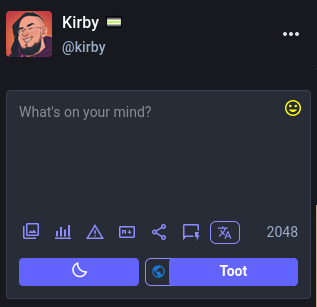
Managed to make the post box look nearly infinitely nicer (imo), even if there are few visual glitches at times.

See attached screenshot!

Replace all but the first section (columns) with this:

! Makes secondory Post button the same size as primary
cathode.church##.button.secondary-post-button:style(flex: 1 1 auto !important)

! Makes the gap between them larger
cathode.church##.compose-form__submit:style(gap: 30px !important)

! Move Post Privacy button between the two post buttons
cathode.church##.compose-form__dropdowns > div:nth-child(1):style(width: 50px !important; position: absolute !important; bottom: 12px !important; left: 45.5% !important)
cathode.church##.compose-form__dropdowns > div:nth-child(1) > button:nth-child(1):style(padding: 4.5px 5px !important)

! Move Language button down next to the char count
cathode.church##.compose-form__dropdowns > div:nth-child(2):style(width: 30px !important; position: absolute !important; bottom: 54px !important; left: 203px !important)
cathode.church##.compose-form__dropdowns > div:nth-child(2) > button:nth-child(1):style(padding: 2px 6px !important)

! Move emoji button back to the top right
cathode.church##.emoji-picker-dropdown:style(position: absolute !important; top: 5px !important;right: 5px !important;)
cathode.church##.emoji-picker-dropdown svg:style(color: gold !important)

!! Make Privacy icons COLORED so they are not as easy to miss
cathode.church##.compose-form svg.icon-lock:style(color: #ffa000 !important)
cathode.church##.compose-form svg.icon-globe:style(color: #1976d2 !important)
cathode.church##.compose-form svg.icon-unlock:style(color: #388e3c !important)
cathode.church##.compose-form svg.icon-at:style(color: #d32f2f !important)

The 4.3 layout annoyed me, so I made some quick rules for uBo.

Released as CC0, and with no guarantees, warranties, or promises.

Put these into your uBo "My filters" section:

!!!!!!!!!!!!!!!!!!!!!!!!!!!!!!!!!!!!!!!!!!!!!!!!!!!!!!!!!!!!!
!! DON'T FORGET TO CHANGE chathode.church TO YOUR INSTANCE !!
!!!!!!!!!!!!!!!!!!!!!!!!!!!!!!!!!!!!!!!!!!!!!!!!!!!!!!!!!!!!!

! Compacts columns and removes the borders between them
cathode.church##.column:style(padding: 4px 0px !important)
cathode.church##.compose-form:style(padding: 0px !important)
cathode.church##html:style(--background-border-color: unset !important)
cathode.church##.status:style(border-bottom: 1px solid var(--dropdown-border-color) !important)


! Makes secondory Post button the same size as primary
cathode.church##.button.secondary-post-button:style(flex: 1 1 auto !important;)

! Makes the Privacy and Language dropdowns small and to the right
cathode.church##.compose-form__dropdowns:style(padding-left: 80% !important)
!!!!!!!!!!!!!!!!!!!!!!!!!!!!!!!!!!!!!!!!!!!!!!!!!!! Adjust ^THIS^ number to match your screen size, sorry, best way I could figure this out, I hate modern web dev :P

cathode.church##.compose-form__dropdowns > div:nth-child(1):style(width: 50px !important)
cathode.church##.compose-form__dropdowns > div:nth-child(2):style(width: 50px !important)
cathode.church##.compose-form__dropdowns > div:nth-child(1) > button:nth-child(1):style(padding: 2px 14% !important)
cathode.church##.compose-form__dropdowns > div:nth-child(2) > button:nth-child(1):style(padding: 2px 15% !important)
!! Values arrived at expreimentally, no clue why it doesn't do the actual numbers!

!! Make Privacy icons COLORED so they are not as easy to miss
cathode.church##svg.icon-lock:style(color: #ffa000 !important)
cathode.church##svg.icon-globe:style(color: #1976d2 !important)
cathode.church##svg.icon-unlock:style(color: #388e3c !important)
cathode.church##svg.icon-at:style(color: #d32f2f !important)
if you need it:

kitty:
foreground #c0c0c0
background #0000af
cursorColor #b0b7c1
color0 #263238
color8 #37474f
color1 #ff9800
color9 #ffa74d
color2 #8bc34a
color10 #9ccc65
color3 #ffc107
color11 #ffa000
color4 #03a9f4
color12 #81d4fa
color5 #ad0304
color13 #ad1457
color6 #2e9d8d
color14 #26a69a
color7 #cfd8dc
color15 #eceff1

vim: https://github.com/Evalir/dosbox-vim-colorscheme

Evalir/dosbox-vim-colorscheme

An oldschool DOS-like nostalgia theme. Contribute to Evalir/dosbox-vim-colorscheme development by creating an account on GitHub.


.hicolor-privacy-icons {
.status__visibility-icon.fa-globe,
.composer--options--dropdown--content--item .fa-globe {
color: #1976D2;
}
 
.status__visibility-icon.fa-unlock,
.composer--options--dropdown--content--item .fa-unlock {
color: #388E3C;
}
 
.status__visibility-icon.fa-lock,
.composer--options--dropdown--content--item .fa-lock {
color: #FFA000;
}
 
.status__visibility-icon.fa-envelope,
.composer--options--dropdown--content--item .fa-envelope {
color: #D32F2F;
}
}