 ComputerBase
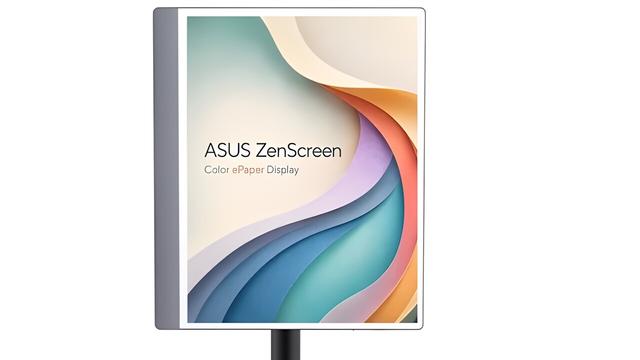
Asus ZenScreen: Farbiges E-Paper-Display in 13,3 Zoll mit Touch vorgestellt https://www.computerbase.de/news/monitore/asus-zenscreen-farbiges-e-paper-display-in-13-3-zoll-mit-touch-vorgestellt.97678/ #asus #zenscreen #epaper #touch #13zoll #computex2026 #MP13UC
Portabler Bildschirm: Neuer Asus ZenScreen mit 14-Zoll OLED-Panel überrascht mit kompakter Mobilität https://www.computerbase.de/news/monitore/portabler-bildschirm-neuer-asus-zenscreen-mit-14-zoll-oled-panel-ueberrascht-mit-kompakter-mobilitaet.97675/ #asus #zenscreen #oled #14zoll #monitor #display #bilschirm #MQ14FCKV

 アスキー
アスキー【良コスパ】2万3000円で16型WUXGA(1920x1200)! 1kg切りのモバイルモニターで仕事したら捗りすぎた
https://www.youtube.com/watch?v=PGqypI1vBh8
#youtube_wamweb #ガジェット #レビュー #ASCII #ASUS #ZenScreen #モバイルモニター #作業効率化

【良コスパ】2万3000円で16型WUXGA(1920x1200)! 1kg切りのモバイルモニターで仕事したら捗りすぎた
 mymobprice
Asus ZenScreen OLED MQ16FC with 65W Charging Launched
Asus introduces the ZenScreen OLED MQ16FC portable monitor with a 16-inch OLED display, 65W power pass-through, and ultra-slim design, ideal for professionals working anywhere.
#mymobprice #Asus #ZenScreen #MQ16FC #PortableMonitor #OLEDDisplay #TechNews
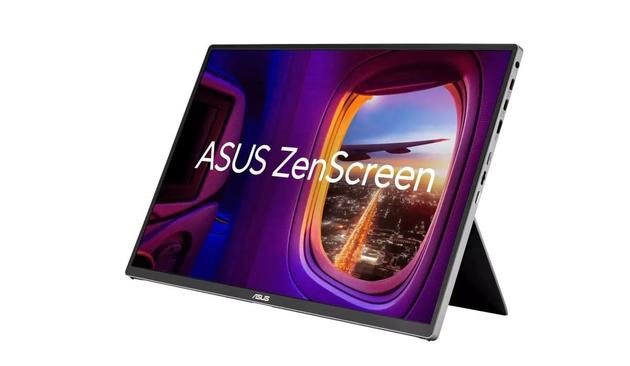
Asus ZenScreen-Monitore: Vom smarten „Google TV“ bis zum tragbaren Mini-Monitor https://www.computerbase.de/news/monitore/asus-zenscreen-monitore-vom-smarten-google-tv-bis-zum-tragbaren-mini-monitor.90592/ #Asus #Monitor #ZenScreen

 Shawn Brink
#ASUS Announces #ZenScreen Smart Monitor MS27UC
https://www.elevenforum.com/t/asus-announces-zenscreen-smart-monitor-ms27uc.30105/
https://www.elevenforum.com/t/asus-announces-zenscreen-smart-monitor-ms27uc.30105/

 AfterDawn
Taittuvat näytöt on nähty jo kännyköissä - ja monissa muissakin tuoteryhmissä. Mutta mikään menestys ne eivät ole olleet.
Asus kokeileekin nyt mielenkiintoista ideaa: entä jos taittuva näyttö olisikin *vain* taittuva näyttö.
ZenScreen Fold on läppärin lisänäyttö, joka on pöydällä 17-tuumainen, mutta jonka voi taittaa 12,5-tuumaiseksi ja heittää reppuun.
https://dawn.fi/uutiset/2024/01/10/asus-taittuva-naytto
#zenscreen #asus #näyttö #taittuvanäyttö #uutiset #teknologia #tekniikka

 Wiktor - wikiyu
As person who very often "do stuff" on my pc outside of ideal conditions of my home office. So i have an easy-to-move small usb-C screen from Asus - zenscreen MBnumbersLettersSth... doesnt care now about model number. Its 15 or 16 inch, full hd, screen with type-c connection (display port + power), and without any speakers.
Now... as i was looking how to have it connected while my laptops only usb-c port would be still available i wondered about DisplayPort chaining. So i have connected other monitor (philips curved with kvm) by DP and then Philips typeC -> Asus typeC and it - of course didnt work...
After that i have read manuals to both screens and i discovered two things:
1. Philips supports chaining when INcoming signal is TypeC or DP and OUTgoing signal have to be DPout and it doesnt support power over DP ofcourse for screen
2. Asus Zen have something that i thought doesnt exist "USB A support" for screen... At first i supposed that they are talking about "TypeC + TypeA => TypeC" cable, like with some HDD that uses two USBs - one for power and second for power and signal.
But then it was stated that it works "only for windows with DisplayLink software installed"
DisplayLink? WTF? What I doesnt know?
Have they created some shit to really pass video over USB 3 type A?
Asus writes about "Windows only feature" so i was pretty sure that there is sth that works on linux, and it may work even better then official one. So i have found DisplayLink website and ... NO. There is some UbuntuOnly Linux installer. But then i found this:
https://github.com/displaylink-rpm/displaylink-rpm
CentOS, Fedora, Rocky linuxes packages that ... just installs and works out of the box. Ofcourse you need "good" USBA->Usbc cable that supports usb 3 transfers (all 9 pins proper connected) but hey! I have fullHD screen without using hdmi, typeC or DP port... For me its real win now.
#DisplayLink #ZenScreen #Linux #Asus
I think that now i need to find a way to have 4 screens at once working on my "max 3 screens" (lenovo says it) system.
Now... as i was looking how to have it connected while my laptops only usb-c port would be still available i wondered about DisplayPort chaining. So i have connected other monitor (philips curved with kvm) by DP and then Philips typeC -> Asus typeC and it - of course didnt work...
After that i have read manuals to both screens and i discovered two things:
1. Philips supports chaining when INcoming signal is TypeC or DP and OUTgoing signal have to be DPout and it doesnt support power over DP ofcourse for screen
2. Asus Zen have something that i thought doesnt exist "USB A support" for screen... At first i supposed that they are talking about "TypeC + TypeA => TypeC" cable, like with some HDD that uses two USBs - one for power and second for power and signal.
But then it was stated that it works "only for windows with DisplayLink software installed"
DisplayLink? WTF? What I doesnt know?
Have they created some shit to really pass video over USB 3 type A?
Asus writes about "Windows only feature" so i was pretty sure that there is sth that works on linux, and it may work even better then official one. So i have found DisplayLink website and ... NO. There is some UbuntuOnly Linux installer. But then i found this:
https://github.com/displaylink-rpm/displaylink-rpm
CentOS, Fedora, Rocky linuxes packages that ... just installs and works out of the box. Ofcourse you need "good" USBA->Usbc cable that supports usb 3 transfers (all 9 pins proper connected) but hey! I have fullHD screen without using hdmi, typeC or DP port... For me its real win now.
#DisplayLink #ZenScreen #Linux #Asus
I think that now i need to find a way to have 4 screens at once working on my "max 3 screens" (lenovo says it) system.
