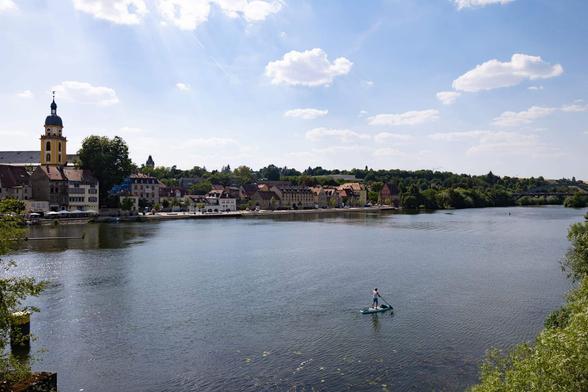
Promenaden Wetter in #Maincity
Frankfurt (ots) - (di) Wo ist Mihaela Zdravkova Ivanova? Das fragt die Kriminalpolizei in Hanau und bittet die Bevölkerung um Mithilfe bei der Suche nach der 17 Jahre alten Vermissten aus Maintal. Die Teenagerin ist etwa 1,65 Meter groß, von ...
https://www.presseportal.de/blaulicht/pm/4970/6237880
#Bekleidung #Gesetz #Kriminalität #Kriminalpolizei #Main #Sicherheitskräfte #Vermisste #VermisstePerson #Vermissten
Question for the RBlind admin
I wasn’t quite sure how to reach you directly, but I was wondering - when I create a post with the “create post” button (not sure if there are other ways?), it has all the fields to fill in. I have to choose a language - of which “English” is the only option. And I have to pick a community - which if I’m posting here on rblind, then “blind main” is the community. Is it possible to just set those as teh default if they’re what anyone posting here has to pick every time anyway?
NVDA 2026.1 Beta 7 now available

Hello folks. I’ve been using Linux for gaming on and off for over a year but I’m getting frustrated. I’m not completely new to Linux outside of gaming, but I’m no master or expert obviously. The two games I play the most are having frustrating issues and I can’t figure out what is happening. I’m hoping someone has some ideas for additional troubleshooting or, if I’m lucky, ideas for a solution. My searching has only found people complaining of more normal, consistent issues like crashing or low FPS vs Windows or just low FPS from the start. Edit: This includes Proton DB. I even have my own experience on there. Also, I don’t really have anything beyond Steam and a number of games via Steam installed. This computer is for gaming and that’s it. Does anyone have an recommendations? After months of this I’m frankly thinking of getting a 9070 XT or something to see if that resolves the issue but that’s a last resort. Thanks! TLDR: Forcing Proton 9.0-4 is the only solution I’ve found. # Hardware ::: spoiler Hardware MB: ASUS B650M-PLUS WF Processors: 16 × AMD Ryzen 7 9800X3D 8-Core Processor CPU Cooler: NOCTUA NH-D15S Case: LIANLI A3-MATX Additional Cooling: be quiet! Silent Wings 4 120mm (x2, Top & Rear Exhaust) PSU: LIANLI SP850 Storage (Linux): SANDISK 2TB WD BLACK SN850X Storage (Windows): ADATA 1TB SX8200PNP Memory: G.SKILL 64G 2X D5 6000 C30 FX B (“EXPO I” Enabled - Running at 6000 as per MB) GPU: NVIDIA GeForce RTX 4080 SUPER (ZOTAC RTX4080S AMP) ::: # Space Marine - Problem 1 I’m typically running at Ultra 1440p Borderless (No Ray Tracing or Framegen) DLSS “Quality” (1.5x Lower Res with Upscaling) with an FPS cap at 120Hz. I get steady performance loss over time, as if the system is throttling but logging shows temperature (and GPU/CPU load) decreasing over time. I’ve tried Native (1440p), a number of DLSS settings, Borderless and Full Screen, lowered detail levels, etc. Nothing I’ve done changes the behavior - GPU load always falls over time and performance tanks until I can’t take it anymore and restart the game. Ex. DLSS “Quality” starts at ~120 FPS, 96% GPU Load At 60 minutes, ~65 FPS, ~55% GPU Load At 2+ hours, ~42 FPS and ~38% GPU Load, GPU Core Clock even drops 200+MHz On Windows 10 I’ve gone 2+ hours at a steady 120 FPS with the same settings. I originally started with Bazzite but out of frustration I figured I’d try openSUSE Tumbleweed, hoping it was some bizarre Bazzite quirk. After some brief testing, I experience the same issue. Normally I use whatever version of Proton Steam suggests, but I’ve tried manually selecting Proton Experimental and 10.2 beta with no change in behavior. I’ve always used NVIDIA drivers rather than nouveau, but I honestly don’t know how to try older NVIDIA drivers. The earlier pages are from August while using Bazzite (BZ). The last few are on Tumbleweed (TW). Usually, I literally start the game, load the “hub”, and let it idle until it kicked me for inactivity 60 minutes later. One log has some actual gameplay + idle to document see how bad it gets after 2+ hours. More recent logs are from different version of Proton, as described above, left idle until I came back and could definitively see a downward trend. Data & Graphs [https://docs.google.com/spreadsheets/d/1hW1nK71pPPGGuhtpWR5Kuv7wQfh8xUta0CgxM1vuwhg/edit?usp=sharing] A few of my graphs. Click the link above for more. FPS drops over time, ~1 per minute. GPU/CPU load drops over time. Temperature is stable then drops when GPU/CPU loads start getting lower. VRAM/RAM is stable. GPU/CPU frequency is stable. SSD Temps don’t seem to exceed 55 C. No reason I can find for it to throttle. ## Native (Idle): [https://lemmy.world/pictrs/image/937d68c3-f3b2-473e-b432-304e832160d7.png] [https://lemmy.world/pictrs/image/599cea8f-c52d-44bd-a79f-580b05a07021.png] [https://lemmy.world/pictrs/image/1131b1fd-ecc7-46b2-a8dc-c8674ebee4a4.png] [https://lemmy.world/pictrs/image/3f90877d-d968-4b25-a861-8cb0c52e0737.png] [https://lemmy.world/pictrs/image/ecb8eb40-02dc-4275-a909-b35227f106ab.png] ## DLSS Quality (Idle): [https://lemmy.world/pictrs/image/bba23372-a015-4f10-b3e3-11fe5cb35866.png] [https://lemmy.world/pictrs/image/09aa2ea5-15d4-4b15-a073-144f7519e2b9.png] [https://lemmy.world/pictrs/image/c94de621-6782-403e-9a2a-0856926ffe14.png] [https://lemmy.world/pictrs/image/3838ab7f-2b1a-4c15-870e-c49d6c216df4.png] [https://lemmy.world/pictrs/image/c40616aa-43c7-48f7-9fef-bd3c519ad3ea.png] ## DLSS Quality (Gameplay, then Idle): [https://lemmy.world/pictrs/image/4a4e1227-4457-4d95-8fb6-7a7d8f5a858b.png] [https://lemmy.world/pictrs/image/d9cd223e-0031-4ce6-a00c-5452c4ba441a.png] [https://lemmy.world/pictrs/image/5bd33b58-9a8b-48cd-82d5-89410f56a6b9.png] [https://lemmy.world/pictrs/image/f24a2bab-e9b5-4fa5-a966-53b3c2ab2078.png] [https://lemmy.world/pictrs/image/67c3b76d-b4aa-40b3-8c79-6dc81e14ee1d.png] Note - the behavior isn’t new in August, I’d just started playing multiplayer more with friends in June. I wanted to focus on just using my Linux partition exclusively and being that annoying friend who talks about how great gaming on Linux is. I assumed it was an issue assets not getting unloaded or something and figured it would be fixed in a patch. By August I’d gotten tired of the weird behavior to start really investigating it, installed MangoHud, etc. After my complaining, my friends are decidedly LESS interested in gaming on Linux. I’m only fueled by my hatred of Windows 11 and spite. # Satisfactory - Problem 2 I haven’t tested openSUSE yet so this is more of a Bonus issue. I’ll update if continue to experience it on this distro. It isn’t as detrimental but its still frustrating because I don’t know how to even document it. At inconsistent intervals, maybe 45-90 minutes, the game hangs for an extended period of time. Alt-tab away and everything is fine with the rest of the system, desktop interface is 100% responsive. If I alt-tab back to the game, it remains hung. Eventually, ~20-40 seconds after it freezes, everything is back to normal until the next random interval when it happens again. Time also doesn’t pass in game - if I was mid air, I resume mid air. Now what is absolutely fascinating to me about this problem is that it is invisible in my mangohud logs. It’s like time stands still until the game resumes. Zero dips, spikes, elapsed time gaps, or anything I’d expect just before it starts or after it recovers. I haven’t figured out a way to include the system time in the log to get records of how long it lasts. If you know how to get that in the log please let me know. # Edits Graphs below for a low-quality run (DLSS Performance & Quality Preset Low) on Tumbleweed. GPU/CPU load starts lower, degrades more or less the same. DLSS Performance, Low Quality Preset (Idle, Gameplay, Idle): [https://lemmy.world/pictrs/image/9b6a8936-c964-43ff-bb6a-d0c4cf51af7b.png] [https://lemmy.world/pictrs/image/2a751837-85b8-41e2-a06c-e311206f3535.png] [https://lemmy.world/pictrs/image/0a5c5aef-87c8-4361-88ba-c299982c6e9c.png] [https://lemmy.world/pictrs/image/1e405ca1-7eff-46b5-a88c-ed78d75e0459.png] [https://lemmy.world/pictrs/image/82567492-1fec-4e00-a2df-1cdc5a38d727.png] I’ve tested my SSD temperature via watch -n 1 nvme smart-log /dev/nvme0 - I’ve not see it above 125° F (<55° C). I have 600GB free on / and 1.2TB free on /home, and I have swap large enough for sleep. I did not run it during gaming yet, but swapon shows: NAME TYPE SIZE USED PRIO /dev/nvme0n1p3 partition 66.5G 0B -2 I’ve run nvidia-smi -q -d PERFORMANCE (while GPU load was down to ~70%) by switching to a cmdline and running it plus recording every second nvidia-smi -q -l 1 -f smi.log -d PERFORMANCE with the game running in the foreground. More or less the same. Sometimes if I’ve not had the focus on the game window for a while Idle will be Active. > nvidia-smi -q -d PERFORMANCE ==============NVSMI LOG============== Timestamp : Tue Sep 23 07:06:07 2025 Driver Version : 580.82.07 CUDA Version : 13.0 Attached GPUs : 1 GPU 00000000:01:00.0 Performance State : P0 Clocks Event Reasons Idle : Not Active Applications Clocks Setting : Not Active SW Power Cap : Not Active HW Slowdown : Not Active HW Thermal Slowdown : Not Active HW Power Brake Slowdown : Not Active Sync Boost : Not Active SW Thermal Slowdown : Not Active Display Clock Setting : Not Active Clocks Event Reasons Counters SW Power Capping : 1160456 us Sync Boost : 0 us SW Thermal Slowdown : 0 us HW Thermal Slowdown : 0 us HW Power Braking : 0 us Sparse Operation Mode : N/A Spent almost 2 hours playing SM2 on Windows 10. FPS stayed ~120 pretty consistently with typical occasional dips, often during loading screens and such. Graphs below. Windows 10 - Gameplay then brief idle: [https://lemmy.world/pictrs/image/0238164f-f15b-469c-836d-968ffe8ffb11.png] [https://lemmy.world/pictrs/image/f508f4d9-288a-4739-8ed8-67de0e637ddc.png] Left the game idle for 20 minutes after installing NVIDIA X Server Settings and setting Prefer Maximum Performance as the preferred mode. Same degrading performance. Using alt-tab to switch to desktop doesn’t restore or reset performance, nor does running vulkaninfo. [https://lemmy.world/pictrs/image/ab18c0d0-2d0f-41c7-bb35-715f02c87ac5.png] [https://lemmy.world/pictrs/image/b0311986-e61b-41e0-85d4-01154ca3eca9.png] It was suggested I test for stability with OCCT [https://www.ocbase.com/]. I did find that with hour long combined Extreme/Steady CPU+RAM/GPU tests would inconsistently register errors with CPU cores. Looking into that, I saw that overclocking might be the cause so I turned off the ASUS motherboard’s “AI Tweaker” setting of “Expo I” (use timings from EXPO memory modules) and set it to automatic. A few hour long Extreme/Steady CPU+RAM/GPU on both Windows and Linux no longer generated errors. Unfortunately, leaving EXPO off did not seem to impact/resolve my issue. The same behavior persisted for another two sessions of gaming without EXPO. # Solution Incredibly stupid. I didn’t realize that, whether it was something I personally set a while ago and that is tied to my account (because this is my third distro) or whether it is Steam’s default, the “Default Compatibility Tool” was set to Proton Experimental. I’d assumed Steam would use the latest stable release, and so I’d manually set SM2 to use Experimental, Hotfix, the 10.2beta, or unchecked the option to force a specific version… I’d never forced 9.0-4. When I discovered there was a Proton logging option, I found that the log showed me using Experimental so I looked around and discovered my default was experimental. I set the default to 9.0-4 and the issue no longer occurred. I went back, set the default to experimental and set SM2 to specifically use Proton 9.0-4. I’ll confirm whether or not this resolves the issue. Confirmed. It seems to be an issue with Proton 10+? As long as I force Proton 9.0-4, the issue does not occur.
Rüsselsheim am Main (ots) - Am Montag, den 16.03.2026, um 07:45 Uhr ereignete sich in der Feuerbachstraße auf Höhe der Hausnummer 17 bei dem dortigen Fußgängerüberweg in Rüsselsheim am Main, ein Verkehrsunfall bei dem ein Schulkind von einem ...
https://www.presseportal.de/blaulicht/pm/4969/6237780
#Explosion #Fußgängerüberweg #Kind #Main #Marke #Personenkraftwagen #Peugeot #Transport #Verkehrsunfallflucht #Verkehrsunglück #Zeugenaufruf
Maintal und Frankfurt am Main (ots) - (cb) Wo ist Mihaela? Das fragt die Kriminalpolizei in Hanau und bittet die Bevölkerung um Mithilfe bei der Suche nach der 17 Jahre alten Vermissten aus Maintal. Die Teenagerin ist etwa 1,65 Meter groß, von ...
$21.6 million flows into Indigenous-led conservation in NWT | The Narwhal
Hofheim (ots) - 1.Sachbeschädigung an mehreren Fahrzeugen, Bad Soden am Taunus, Haingrabenstraße, Freitag, 13.03.2026, 22:00 Uhr bis Samstag, 14.03.2026, 11:30 Uhr (dg)Unbekannte Täter beschädigten in der Nacht von Freitag auf Samstag insgesamt ...
https://www.presseportal.de/blaulicht/pm/50154/6235969
#Diebstahl #Gesetz #Kriminalität #Kriminalpolizei #Main #Motorroller #Sachbeschädigung #Sicherheitskräfte #Taunus #Wohnungseinbruch
Reading via /feeds/front.xml/
Hi everyone, I hope this is a proper channel to reach out to the maintainers of this instance. I saw in the documentation (linked) that it is possible to read via RSS not only full content or entries in specific community, but also a single RSS feed that includes entries from all my subscribed communities. My front page in the RSS format. Is this feature activated on feddit.org [http://feddit.org]? I followed the documentation: appended to the URL https://feddit.org/feeds/front.xml/ my JWT token extracted from the cookies, and this request produced a 404 Not Found error for me. Is there some mistake on my side, or is there another reason?