Review: HOZO Design NeoRuler

Measurements are an area that haven’t really undergone that many real innovations over the years. The humble ruler, even less so. HOZO Design aims to change that with its NeoRuler, which is a measuring tool that can help both at the desk and away from it.

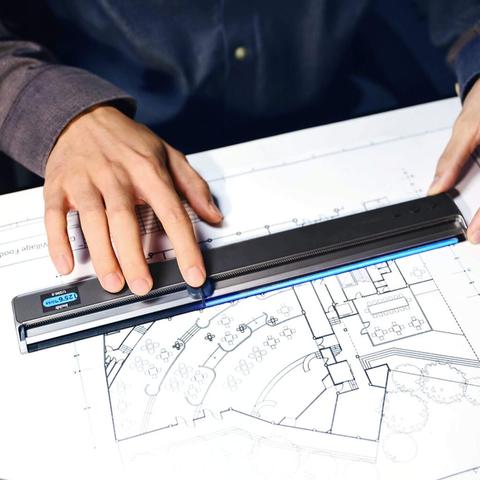
The NeoRuler is basically a considerable expansion of the concept of the ruler. To start with, you don’t have the usual ruler functionality of markings for centimeters and inches on the edges. And, as equipped, it looks more like a set of calipers.

This takes the more advanced route of requiring a small display to actually tell you how long something is. Instead of measuring simply by putting the ruler against an object and using your eyes, you instead have to move a physical indicator along the length of the ruler, along a channel. Doing so will display the measurement on the LCD display, in millimeters and inches.

Hardware Specs
1.14″ backlit true-color LCD display 240×135 at 240DPI
0.004″ (0.1mm) resolution
12″ (305mm) measuring range
0.4lb (184g) weight
1000 mAh lithium-polymer battery
180-day battery life in standby, 12 hours of continuous use under maximum power consumption
Aluminum Alloy, Stainless Steel, ABS, PC, and POM
Bluetooth 4.0

Product Design

The NeoRuler utilizes a segmented LED strip along the edge of the ruler and a 1.14″ backlit true-color LCD display to display measurements. There are no labeled increments along the ruler, but instead, a sliding pointer is manually moved and the distance is displayed on the screen.

The screen is absolutely fabulous. It’s probably the easiest-to-read screen you’ll ever see. There is a non-glare coating over the screen that makes it easy to read even with bright overhead lights.

There are three buttons on the end that you use for various functions. Near the display, there is a Type-C port for charging the 1000 mAh battery.

The Premium Combo includes the NeoRuler, NeoCaliper, NeoPointer, and NeoMaginfier. The pointers are simple, one for regular measuring and drawing, and two that are used for guiding pencil, pen, or marker tips.

The digital nature of the HOZO Design NeoRuler was one of the things that intrigued me. The NeoRuler can display measurements in multiple units such as mm, cm, m, inch (decimal and fractional), feet, yard, and mike/km when in map mode with a scale greater than 1:50000.

One of the things I found interesting is that you can “zero” the ruler at any point along its length, and the ruler will display measurements when you move the pointer in either direction. This is handy when you want to leave the ruler along a line and measure from one place to another without lifting the ruler.

One of the main features of the NeoRuler is its Smart Scale feature. There are 93 built-in scales distributed in 8 scale modes. For example, in the architectural mode, there is a scale for 1″ = 1′. If you’re drawing something that isn’t actual size, these modes can be quite a lifesaver and will save you from having to do a lot of math.

Display Screen And Battery Life

Unlike a typical caliper, the NeoRuler has a color LCD screen with a resolution of 240×134 and 240 PPI. The screen has a diagonal size of 1.14″, which might seem a bit small on paper but on-hand is a useful size with a UI that makes a smart use of the size/resolution of the display to provide all the necessary information without becoming neither overwhelming nor lacking details. Through the mobile app you can customize the color theme of the display to better adjust to your preferences.

Inside is a 1,000mAh battery with USB-C charging, but you’re probably not going to need to recharge it that often. You can get up to 14 days of continuous usage under “comprehensive power consumption,” or 12 hours of continuous use under its maximum consumption setting. It also boasts 180 days of battery life when left in stand-by mode.

Portable And Durable

Rulers from the traditional age remain portable yet their delicate construction remains their biggest weakness. Plastic can crack. Wood can warp. paper-based markings gradually disappear due to the elements passing by.

NeoRuler is compact and durable. NeoRuler’s strong housing safeguards interior technology. The built-in rechargeable power system maintains its readiness through an entire working day. The tool serves all professionals who regularly work in both office environments and classroom and field-based settings.

Final Thoughts

For $249 the HOZO Design NeoRuler certainly isn’t for everyone. It’s more for those that measure things day in and day out, or at least on a pretty regular basis. For someone like me who doesn’t work in a field that requires measuring, it’s out of my price range for sure. For those that do work in certain fields, I feel this would be a great bargain with all that it does.

#HOZODesign #NeoRuler #Reviews #Technology #Tools

Review: HOZO Design M-Cube 02 Anti-Gravity Laser Level

Let me start off by giving a huge thank you to the folks over at HOZO Design for sending this product over to me. When I saw the press release I immediately knew I wanted to give this a try. Mainly because I have quite a few things hanging in my house that weren’t the easiest to hang due to being in multiple parts, and I wanted to go back and make sure they were actually level, and not just level to the eye.

What’s In The Box

M-Cube 00 Laser Measure – already mounted on the Laser Level
M-Cube 02 Laser Level
TargetMate (accessory)
GripMate (accessory)
CenterMate (accessory)
USB-C to USB-A charging cable
Large screw adapter for the AdaptMate
Several quick start books

Design And Build Quality

I didn’t expect to be this impressed by a laser level the moment I pulled it out of the box, but the HOZO Design M-Cube 02 Anti-Gravity Laser Level pulled me in pretty much instantly. First was by the quality of the product itself. Solid, well built and something that wasn’t made cheaply or in a rushed amount of time. If you’re like me and want to make sure all of the things hanging on your walls within your house are level, then this product is for you in so many ways. At $149, it’s not just another gadget but more of a tool that feels smart, solid, and genuinely helpful as well as very much useful.

The M-Cube 02 has a compact, cube-like design, constructed from durable materials like ABS plastic, PC plastic, and aluminum alloy. Design elements include a vacuum suction pad, laser emitter, display screen, control buttons, battery indicator, Type-C charging port, modular interface, and LED indicator.

The buttons on the side of the HOZO Design M-Cube 02 are very easy to press and are located in an easy to reach place on the product itself. I can’t stress enough how well thought out this product is when it comes to design and build quality.

Assembly, Installation And Setup

I made sure the laser measure and Level were fully charged by plugging it in using the USB-C cable that was included in the box. I knew it was fully charged once all four LED lights lit up in a purple color.

The next step was to calibrate the gryo in the laser measure. I had to remove it from the laser level and place it on a flat surface. I then went to the settings and pressed the calibrate icon, which only shows up when the measure is separated from the level. From there, I simply hit the calibrate button on the screen and followed the prompts.

The next step was to place the product on its side and tap the calibrate button once again. In only a matter of seconds, the calibration was complete and I snapped the measure back to the level and was ready to start using the product. HOZO Design couldn’t have made this any simpler or quicker.

Performance

The first thing I did was put the product against one of my closet doors, only because I was standing right next to one and since it has a semi-gloss surface, I figured that might make it harder to stick to the surface. Much to my surprise, I placed it up there and hit the button to activate the suction and it instantly stuck to the door. I had to put absolutely no pressure of any kind.

I then took it off the closet door and moved it over to the wall which has a flat surface with very minimal texture. Again, I held it up to the wall and pushed the button and just like that, it was once again stuck to the wall without applying pressure.

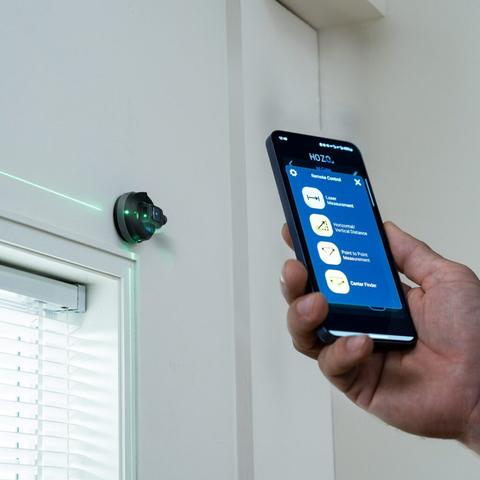
Once it was mounted in the center of my wall, I selected the Mid-Point Finder on the screen. I had to rotate the top laser so it pointed at my first point, which I picked as the left wall. It then asked me to pick my second point which was the ceiling.

The laser system is dual-color, which is a great touch. Red laser gives you tighter precision (±1/16 inch), while the green is a bit looser (±1/8 inch) but much easier to see in bright conditions. The angle accuracy sits at ±0.1°, which might sound small, but it makes a real difference when you’re aligning things like shelving or trim work.

If you’ve already got the MEAZOR app, good news, it integrates with this module, giving you access to digital readouts and configuration options. It’s not essential, but it definitely adds polish to the experience.

Extra Accessories That Matter

HOZO bundles in three key accessories: TargetMate, GripMate, and CenterMate. These aren’t gimmicks, they really do improve precision and make setup smoother on a wider range of surfaces. GripMate in particular is handy for slicker materials where the vacuum hold might need backup.

The MEAZOR App

The MEAZOR app enhances the M-Cube 02’s functionality by providing remote control, real-time data display, data recording, advanced functions, firmware updates, floor plan capture (with some modules), unit conversion, and device settings customization.

Remote Control: Users can control the M-Cube 02's functions directly from their smartphone or tablet, eliminating the need to physically interact with the device in many situations.
Real-time Data Display: The app displays measurements and other data in real-time, allowing for precise adjustments and immediate feedback.
Data Recording: Measurements can be recorded and stored within the app, facilitating documentation and reducing the risk of errors associated with manual transcription.
Floor Plan Capture: In conjunction with compatible M-Cube modules, the app enables the creation of digital floor plans. This feature streamlines the process of surveying and mapping spaces.
Unit Conversion: The app allows users to easily switch between different units of measurement (e.g., meters, feet, inches), increasing versatility and reducing the need for manual conversions.

Final Thoughts

The HOZO Design M-Cube 02 isn’t just “a laser level.” It’s a precise, well-thought-out tool that respects your time and effort. It sticks to things without damaging them, saves you from extra trips up and down the ladder, and adapts to how you like to work. If you’re serious about getting things right the first time, or just want fewer crooked frames in your life, this is a worthy addition to your toolbox.

At the time of this writing, the HOZO Design M-Cube 02 costs $149 USD which to me is a great price for what it does and everything it offers. While I haven’t looked specifically for this type of thing in stores, my guess is that something similar with as good quality as this would likely be closer to $300 USD.

Other Products By HOZO Design

The awesome folks at HOZO Design also sent me their NeoRuler to review. I haven’t had much time with it as of yet, but hoping to do so this coming week, which means the following week I should have the review of that product published here as well. So keep your eyes peeled to the site for that review. I can give you a quick heads up, it’s yet another very well product what little bit I’ve used it so far.

#AntiGravity #HOZODesign #LaserLevel #LaserMeasure #Level #MCube02 #Reviews #SmartLevel #Technology

HOZO Design - Future of Laser Measure Tool and Digital Ruler

Discover HOZO's innovative laser measuring tools and digital rulers for precision, elegance, and ease in every project.

HOZO Design
How about this wonderful #TechDrop in which I open up a gadget worthy of my engineering career? Meet M-cube by #HozoDesign
https://youtube.com/shorts/sXiQaExGraU?feature=share
Bevor Sie zu YouTube weitergehen