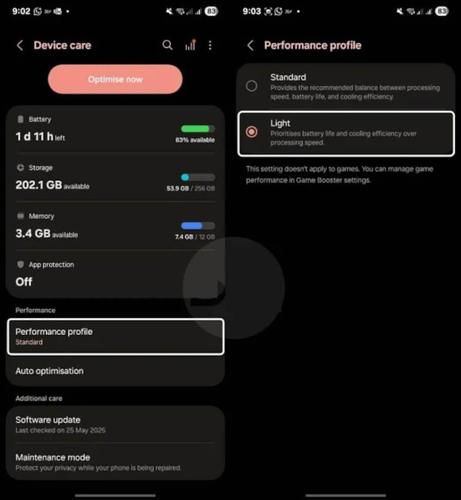
Samsung battery draining fast on One UI 7? Turn off adaptive battery, clear cache partition, disable nearby device scanning, and switch to light performance mode. These proven fixes can extend your screen time by 45+ minutes! #Samsung #OneUI7 #BatteryDrain #GalaxyTips
https://pupuweb.com/is-your-samsung-battery-draining-fast-try-these-powerful-one-ui-6-7-optimization-tips/
Unlock smoother performance on your Samsung Galaxy: enter *#2663# in the dialer to access a hidden menu for updating touchscreen and S Pen firmware. Boost speed, touch response, and Wi-Fi stability—no data loss, no root needed! #SamsungHiddenCode #GalaxyTips #AndroidHacks
https://pupuweb.com/will-using-samsungs-hidden-code-instantly-improve-your-devices-performance/
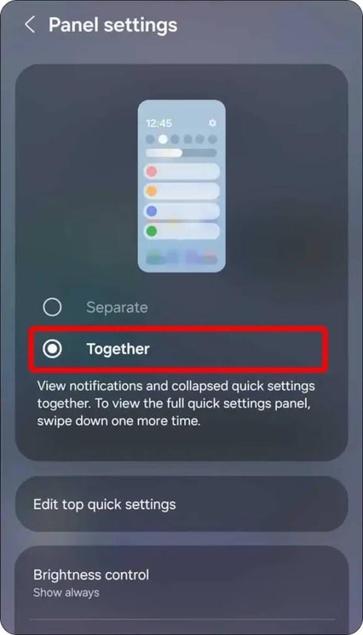
Want a smoother experience with Galaxy device? Merge Notifications & Quick Settings in One UI 7 for faster access to everything you need with just one swipe! ⏳ Here's how to streamline your phone's interface in seconds. #OneUI7 #GalaxyTips #SmartphoneHacks
https://pupuweb.com/how-can-you-merge-notifications-and-quick-settings-in-one-ui-7/

How Can You Merge Notifications and Quick Settings in One UI 7? - PUPUWEB
Struggling to Combine Notifications & Quick Settings in One UI 7? Here's the Fix! One UI 7, Samsung’s sleek and customizable interface, offers plenty
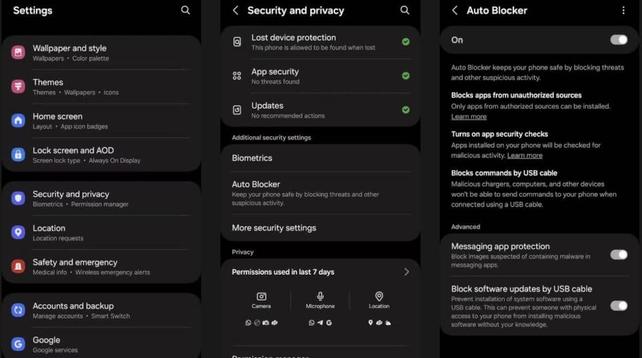
Want to boost your security on Samsung Galaxy? 🔒💥 Discover how to enable the auto-blocker feature and keep your device protected from unwanted threats. Stay safe with this easy guide! #SamsungSecurity #TechTips #MobileSecurity #SmartphoneHacks #GalaxyTips
https://pupuweb.com/how-to-enable-auto-blocker-on-samsung-galaxy-for-maximum-security/

How to Enable Auto Blocker on Samsung Galaxy for Maximum Security? - PUPUWEB
Auto Blocker is like a digital bouncer for your phone. It keeps out shady apps, blocks sneaky USB commands, and even stops malware hiding in images. If
 PUPUWEB Blog