 Antoinne Sterk
Day 3: Monitors are up again
Follow up on: #WeirdScreenshot #DeadHardware
Order has been restored (5760 x 1080) #NewHardware

Day 3: Monitors are up again
Follow up on: #WeirdScreenshot #DeadHardware
Order has been restored (5760 x 1080) #NewHardware
Day 2: We have transport (Wow...)
Day 1: Entry
#WeirdScreenshot #DeadHardware
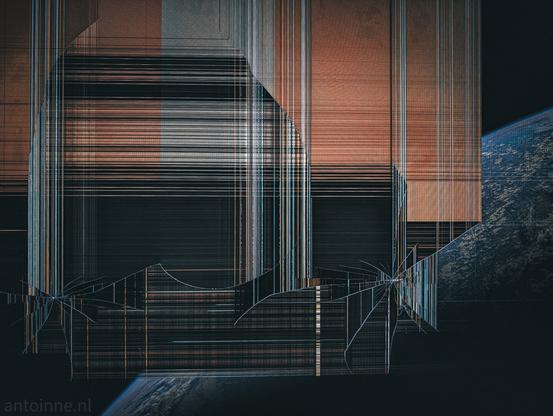
* Something weird is happening. The trippy feeling has gone, but my left monitor suddenly shows what looks like a weird portal to another world. At least, that's what I think it is. I need to figure out what it is. I'm going in...
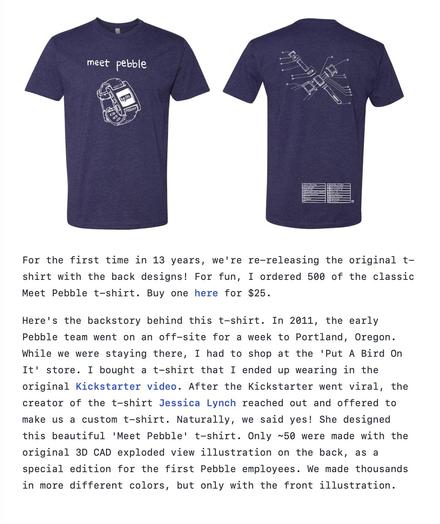
*This guy is re-making ancient digital watches, so of course he has to re-release the original 13-year-old support merch. #deadhardware #revival
So I broke my PC… and its replacement (Part 1)
So my main PC that I do all my video editing, programming and anything more complex than talking rubbish on Discord died. Totally dead. How it died is a story for this video and involved me, a new NVMe SSD and a screwdriver.
It wasn’t too bad because I’d been looking for an excuse to buy a new machine anyway. My PC was originally created in 2017 to play VR games with a Rift CV1 headset, and over the years has become a tad outdated. I did put a new GPU in the machine and this helped a lot, but the CPU and motherboard were getting on a bit. I just wasn’t expecting to need to upgrade so soon.
And I certainly didn’t expect the complete mess that ensued when trying to build a new machine. You think it’d be simple, right? Just order the parts, put them together, it takes about half an hour.
Yeah that’s what I assumed too. And things were going great until the new machine crashed in its BIOS and refused to boot unless I removed one of the RAM sticks.
This is part 1, part 2 follows…
https://ncot.uk/?p=2161
🧑💻Well crap, my PC died💾
Due to the untimely demise of my main PC, and it being the time of year where I have to get my car serviced, there will be a short break before my next video comes out.
My PC that I edit video on is actually dead, it doesn't even attempt to power up. This is kind of annoying since now I need a new one. However, I did build it in 2017 so maybe I do need
Read More 👉https://ncot.uk/well-crap-my-pc-died/
#DeadHardware #Electronics #NVMe #PCHardware
Well crap, my PC died
Due to the untimely demise of my main PC, and it being the time of year where I have to get my car serviced, there will be a short break before my next video comes out.
My PC that I edit video on is actually dead, it doesn’t even attempt to power up. This is kind of annoying since now I need a new one. However, I did build it in 2017 so maybe I do need an upgrade.
I’ve tried everything I can think of. Unplugging the PSU and shorting the green wire to ground makes the PSU power up fine. Removing everything except the CPU and the PSU also doesn’t make anything happen. The motherboard is one of those “gaming” ones so has LEDs, but not even those come on.
So while I don’t mind going new computer shopping and will no doubt find the newer machine much more pleasant to use, it would have been nice if it hadn’t died this month. Although I have a bit of a suspicion I might have accidentally killed it. I was upgrading the M.2 NVMe drive, which meant removing the video card. Except the PCIe slots on this motherboard have retaining clips that you need to poke at with a screwdriver, and my screwdriver might have slipped…
I have a nasty feeling the screwdriver might have shorted things out either on the board or the CPU. I swapped the existing NVMe drive for the new one and my PC crashed when doing a POST, but worked fine again when I put the original SSD back in. I did a BIOS update thinking that would help. The BIOS update went fine, the PC rebooted, Windows loaded, all was well again. I even had the Windows 11 update thing tell me the PC had a valid TPM module now – but an unsupported CPU.
I shut the machine down, went to remove the GPU from its slot but it got stuck because of the stupid retaining clip on the PCIe socket. The card wouldn’t go back in its slot because the slot bracket had got wedged in the case, so I tried unclipping the slot clip with a screwdriver and it slipped, possibly jabbing the motherboard.
There’s no visible damage on the board, but since it appears 100% dead and was working perfectly well before swapping its innards, I think I might have poked something important with the screwdriver and shorted it. But nothing went pop and no magic smoke was released.
I do wonder if the new NVMe drive is faulty, surely it shouldn’t make my entire PC crash at the BIOS screen. To try this I’ve ordered a USB-NVMe adapter to see if the drive is OK or not.
#DeadHardware #Electronics #NVMe #PCHardware
https://ncot.uk/?p=2090

 Bruce Sterling @bruces
 james
james