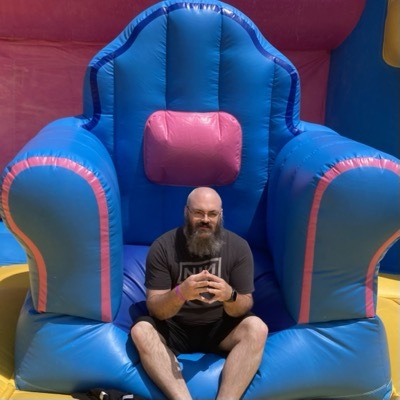
I’m being a total dork and wearing my AVP in the office right now. It’s weird to blow up a window and for a second be concerned that someone can see my Teams messages, but then realize that literally no one can.

It’s weird that my current world view is full of windows and if someone walks by I can’t see them because they’re behind a bunch of windows, but they can see my silly goggle face.
#AppleVisionPro
#CookiesAVP

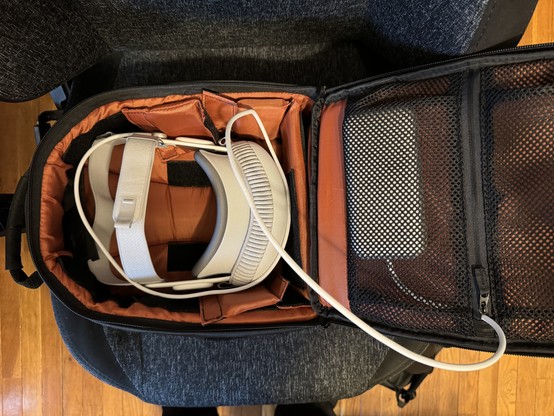
as i suspected, the AVP fits great in a camera bag. i’m able to reuse this cheapo one i got off Amazon ~5 years ago when i got a fancy camera.
#AppleVisionPro
#CookiesAVP

visionOS doesn't have a dark mode setting outside of setting the Environments theme to Dark. compatibility apps seem to default to light mode. if an app running in compatibility doesn't have manual settings for dark mode, users are stuck with that app in light mode.

i'm curious if developers are able to poll visionOS for the environment setting like they poll iOS' without making it a native app.

#AppleVisionPro #CookiesAVP

i can't find a way to natively VNC or remote into another Mac except to look at it. which you have to break immersion to do.

trying the VNC URI in Safari and an Open URL action in Shortcuts didn't work.

if you have a Mac server that you want to remote into, you're probably going to need a 3rd party tool like Screens.

the built-in remote connection is good enough that you _could_ play World of Warcraft on it, but it's not a good enough that i'd actually do it.

#AppleVisionPro #CookiesAVP

as far as i can tell, the Home View of apps can't be modified. 3rd party apps seem to get installed onto the second "page" in alphabetical order. compatibility apps go into a Compatibility folder on the first page in alphabetical order.

hopefully this changes sooner than later since this isn't tenable for a weirdo like me who tends to install hundreds of apps (140 on my phone after starting fresh in September.)

#AppleVisionPro #CookiesAVP

i'm curious if other AVP lens users are experiencing glare? when i get bright windows, i'm getting what i'm very certain is glare on i think the lenses.

i tried removing my lenses and it was _very_ blurry for me (i have a strong script.) OpticID immediately failed and i could tell that looking at the passcode numbers was off.

AVP can tell when you remove the lenses and notified me what lenses were inserted when i put them back in and dived again.

#AppleVisionPro #CookiesAVP

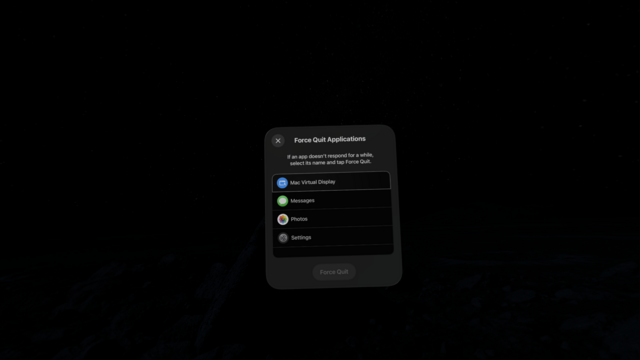
i've had to force quit one app so far (it was an iPad app running in compatibility mode).

to force quit an app on AVP you hold town the ‘top button' and digital crown button for ~5 seconds and you'll see this force quit menu.

side note, as far as i can tell the Photos app in AVP doesn't have the ability to edit images.

#AppleVisionPro #CookiesAVP

visionOS 1.0.2 it takes up 11.96GB of storage, the Environments take up 1.33GB, and there's this “System Data" taking up 33.57GB which apparently is “caches, logs, and other resources”.

in total i'm using 60.7GB of storage on day one so far.

#AppleVisionPro #CookiesAVP

the only way i've gotten continuity to work so far is by starting a remote session with my Mac first. there doesn't seem to be a "drag your mouse to the Apple Vision Pro” (AVP). i also haven't gotten my mouse to work at all with continuity.

i have a feeling that i'm going to end up with a dedicated wireless keyboard and mouse... or maybe i'll retrofit my Moonlander with bluetooth somehow 🤔

#AppleVisionPro #CookiesAVP

I’m going to start posting some #AppleVisionPro notes. i’m going to try and remember to use that tag and #CookiesAVP so that people can mute these posts if wanted 😅

i'll start with macOS continuity is both awesome and a tad annoying. i'm now drafting this remotely from my Mac because continuity keyboard kept failing. it's still pretty cool that i can do this at all, though.