
Etienne van Delden de la Haije
- 9 Followers
- 41 Following
- 206 Posts
Hi! I'm Etienne, I'm a dad, a “forever”-Dungeon Master and a Ruby on Rails engineer.
 Hacker News
 Batsify
@joeldrapper I'm not trying to single anyone out here, but I'm starting to see users (not developers) looking for alternatives to products that use Ruby. I think they don't really understand what's happening.
The loss of trust caused by the Ruby Central controversy extends beyond the Ruby community.
It's now affecting users of Ruby-based projects as well.
 Dave Clark
@KeithAmmann those three MtG books had great monsters, fun subclasses-backgrounds, etc
I didn't like the adventure elements from any of them, but the rules content was amazing
 Adrian from avohq.io
Friendly.rb is taking a break.
We've had quite a few questions about that and wanted to share them publicly.
 Dave Copeland

 postmodern
Added ruby 3.4.6 to the ruby-versions database. ruby-install users can now safely upgrade to 3.4.6.
$ ruby-install -U ruby-3.4.6
https://www.ruby-lang.org/en/news/2025/09/16/ruby-3-4-6-released/
https://github.com/postmodern/ruby-install#readme
 Jesse Grosjean
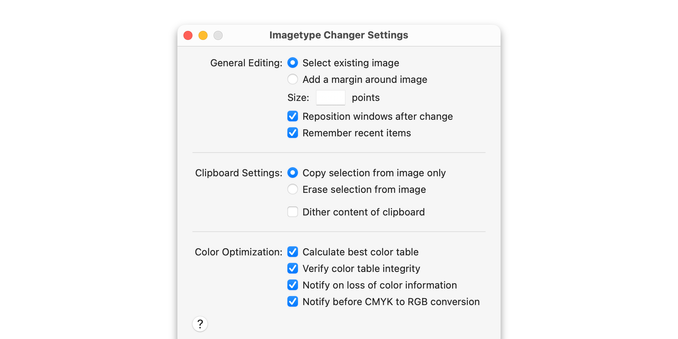
I recommend all macOS developers check out @marioguzman's Layout Guidelines. I just came across them myself, really useful.
Generally I just eyeball these sorts of layouts and try to make them "feel" right, much nicer to have some actual rules and why's and how's.
 Smashing Magazine
🌍 Internationalization isn’t just translation. It’s about formatting dates, pluralizing words, sorting names, and more, all according to specific locales. Instead of relying on heavy third-party libraries, modern JavaScript offers the Intl API — a powerful, native way to handle i18n. A quiet reminder that the web truly is worldwide: https://www.smashingmagazine.com/2025/08/power-intl-api-guide-browser-native-internationalization/
 Scott Laird
I finally wrote up how to get passwordless SSH and sudo using 1Password-managed SSH keys, following @ethanschoonover's example from a month or so ago:
https://scottstuff.net/posts/2025/07/04/passwordless-ssh-and-sudo-with-1password/
This is relatively easy with a Mac laptop, but I have it working with a Linux desktop and a Yubikey Bio for authentication, using the same keys, so I can work from either my work laptop or my personal Linux desktop.

Passwordless SSH and sudo with 1Password on Mac and Linux
I’ll admit: I’m terrible at managing SSH keys. Every time I build a new desktop I end up generating a new SSH key with ssh-keygen and then half-heartedly copy it to authorized_keys on machines that I ssh into. The machines that I use most often have huge authorized_keys files including keys from machines that died years ago, while systems that I rarely use don’t have any keys at all and I end up falling back to passwords until it annoys me enough to copy keys over. This has been especially annoying over the past month or two as I’ve turned up a bunch of new systems at home, plus I added a new work Macbook Pro. I’d looked at various SSH key management systems, but they all looked like work to set up and maintain. For a single-user organization, I couldn’t see how they’d actually pay off. Fortunately, right about this time I came across a Mastodon post from Ethan Schoonover,The guy behind the solarized color theme. where he set up sudo authentication using 1Password for SSH key management and pam_rssh for sudo: I liked his setup enough that I stole it wholesale, including getting it working (with fingerprints!) on my Linux desktop as well. Here’s how I accomplished this, so hopefully you don’t need to jump through as many hoops as I did.
 Mike Perham
The key to coding productivity is your Mental Model: your own understanding of how all the software and APIs are interacting.
With AI, you aren’t strengthening the mental model in your head and really that’s what employers are paying you for: your experience just boils down to the knowledge in your head.
For junior developers, AI is candy: no nutritional value at all. Eat your vegetables, read lots of code and develop that mental model.