Tips from Nadiyno.org: how to protect home IP cameras

https://peertube.eqver.se/w/gXz5TGth9cA3o2QANvmc75

Tips from Nadiyno.org: how to protect home IP cameras

PeerTube
🚨 Factory mystery solved: Why PTZ cameras kept rebooting
The culprit? Wrong PoE standard.
❌ Standard PoE (15W): Can't handle motorized pan/tilt + IR illumination
✅ PoE++ (100W): Powers high-demand devices properly
Lesson: Device power requirements ≠ PoE standard assumptions
Key insight: Always match power specs FIRST, then choose switch.
[Complete PoE selection guide →https://cloudswit.ch/blogs/how-to-choose-poe-poe-and-poe-switches-properly/]
#PoE #NetworkTroubleshooting #IPCameras #PowerOverEthernet #LessonsLearned
How To Choose Right PoE, PoE+, And PoE++ Switches?

This article is to introduce how to choose the right PoE, PoE+, and PoE++ switches step by step, along with some common Q&A.

Asterfusion Data Technologies
IP Camera Hacking: The FFmpeg Tool for Streaming Camera Video

Welcome back, aspiring cyberwarriors!As you know, Hackers-Arise has been deeply involved in the cyberwar to help save Ukraine from the brutal Russian aggression. As part of that effort, we were asked by the Ukrainian military to hack IP cameras throughout Ukraine in order to spy on Russian activities.As part of that task, we have developed a wealth of knowledge about these IP cameras and these use and abuse. One of the tools we have used in this regard is ffmeg (to learn more sign up for our upc

hackers-arise

Hackers Using New IoT/OT Malware IOCONTROL To Control IP Cameras, Routers, PLCs, HMIs And Firewalls
https://gbhackers.com/iocontrol-iot-attack/

#Infosec #Security #Cybersecurity #CeptBiro #Hackers #IoT #OT #Malware #IOCONTROL #IPCameras #Routers #PLCs #HMIs #Firewalls

Hackers Using New IoT/OT Malware IOCONTROL To Control IP Cameras, Routers, PLCs, HMIs And Firewalls

Recent cyberattacks targeting critical infrastructure, including fuel management systems and water treatment facilities in Israel and the US,

GBHackers Security | #1 Globally Trusted Cyber Security News Platform
Surveillance cameras or #IPcameras often lack #IPv6 support.
The only devices that I know of that are being advertised as v6 ready are those from #hikvision. I bought a cheaper one from the HWC series that actually is also #lPv4 only but the more expensive ones seem to have v6 support. I would love to get my hands on them. #frigate #homeassistant

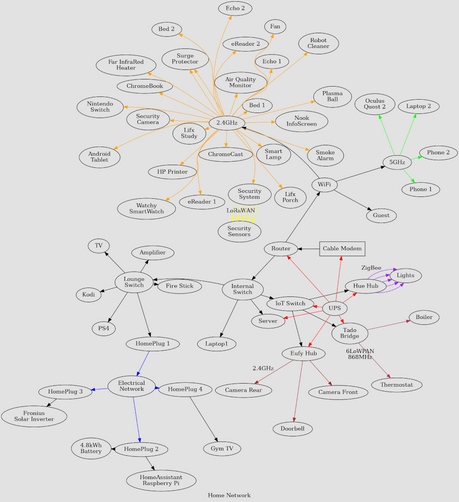
🆕 blog! “My Underkill Home Network”

There's an absolutely delightfully bonkers post doing the rounds called "My Overkill Home Network" - which is a look into what happens when a computer geek goes feral and stuffs as many Internet connected thingamajigs in a living space. We're talking professional grade, rack mounted, doubly redundant, over-specced, equipment. Overkill is underselli…

👀 Read more: https://shkspr.mobi/blog/2023/08/my-underkill-home-network/

#IoT #ipcameras #network

My Underkill Home Network

There's an absolutely delightfully bonkers post doing the rounds called "My Overkill Home Network" - which is a look into what happens when a computer geek goes feral and stuffs as many Internet connected thingamajigs in a living space. We're talking professional grade, rack mounted, doubly redundant, over-specced, equipment. Overkill is underselling it. I wondered [...]

Terence Eden’s Blog

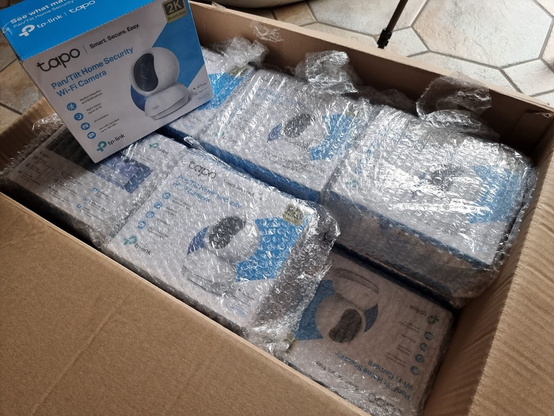
Home security upgrade: 2 external #WiFi #TAPO #IPcameras from #TP-Link for test and 12 internal cameras with PTZ (got them for half price).

All this will be connected to #BlueIris #HomeAssistant and #NodeRED

Now I need.. 14 #microSD cards...
-___-

I kinda find it freaky how much IPcam and webcams are just open on shodan.

I seen one bathroom cam idk why anybody would... But a decent bit of bedroom or living room cams. There's one that was in a dying room. (Funeral home, spooky)

There's also some cool cams like rivers.

On the opposite end of the spectrum of wtf. Was a cam in a dark forest can't read text but it def felt like a slideshow so maybe 5fps?

Secure your damn cameras! And using default settings of admin:admin isn't secure either.

#shodan #security #ipcameras #webcam #privacy

Update to this: The cameras are designed in such a way that, without cracking this IP68 sealed device open, I literally cannot access the camera itself directly. The USB-C port is power rails only. The base station that the cameras connect to is sniffable on the network but doesn't have any accessible ports for me to try and access anything. I'm going to have to wireshark it I guess to see what's even going on between the base station and the internet.

I have done zero research into how the cameras are talking to the base station. I'm presuming some obscure bandwidth that I can't hijack.

I don't have the option to disassemble these devices because they're expensive and belong to the company.

The AI features are decent. I really hate that you're locked 100% into a phone app.
You can enable an RTSP stream but it only comes online when motion is detected.
It doesn't support ONVIF and there's no way to look at the cameras from anything that isn't an iPhone or an Android phone.

I'm willing to concede that, personally and professionally, I'm super duper not their target market for this product. S3 photo/face data insecurity aside, I'd much rather have this (mostly) local camera configuration than a Wyze camera or a Ring. They straight up put your shit onto servers in a completely opaque way.

ACAB includes Ring cameras, btw. Amazon owns Ring and will give that footage to local PDs without a warrant. They own your video data and are using it to build an ad-hoc police surveillance botnet in the suburbs.

At the end of the day, I'm always going to choose IP cameras on their own subnet routing into a VMS. I have the knowledge and inclination to do that but most people do not.

At this moment, there are literally zero cameras in what I'll call the "end user" class that I would recommend if you're concerned about privacy and security. Every single one of them is able to offer you convenience at the expense of your control over the data.

If you HAVE to go the route of cameras like this, Eufy is probably the closest to being secure but that isn't saying a whole lot.

If you do choose to use cameras in this class (or really even more enterprise-grade hardware) for your home, my advice is this:
- If you can, use an ad-blocking DNS on your network such as a Pi-Hole, NextDNS, Cloudflare DNS, etc. that will allow you to find and block suspicious URLs your camera may be chattering with
- Only place them on the outside of your home. You'll get the same amount of security but a bad actor will only be able to see things that are publicly visible anyway. Putting cameras inside your home gives bad actors an INCOMPREHENSIBLE amount of data pertaining to your daily life, habits, and the nice things you own
- You CANNOT rely on these cameras as your only form of security if break-ins and the like are your concern. Most will only record specific types of motion and you simply can't rely on the motion triggers working every time.

#surveillance #cameras #ipCameras #security #homeSecurity #Eufy #Ring #Wyze
Gitpaste-12 Worm Widens Set of Exploits in New Attacks - The worm returned in recent attacks against web applications, IP cameras and routers. https://threatpost.com/gitpaste-12-worm-widens-exploits/162290/ #androiddebugbridge #vulnerabilities #webapplications #cryptocurrency #cve-2020-10987 #cve-2020-17496 #cryptominer #gitpaste-12 #ipcameras #vbulletin #pastebin #malware #exploit #routers #github #monero #hacks #linux #unix #worm #iot
Gitpaste-12 Worm Widens Set of Exploits in New Attacks

The worm returned in recent attacks against web applications, IP cameras and routers.

Threatpost - English - Global - threatpost.com